EN-64
Other Settings (continued)
HOW TO OPERATE (continued)
44
Selecting cooling or heating mode
This menu is provided to limit the operation mode to
the cooling (COOL/DRY/FAN) or heating (HEAT/
FAN) mode only. This menu is useful to prohibit
cooling or heating for multiple air conditioners.
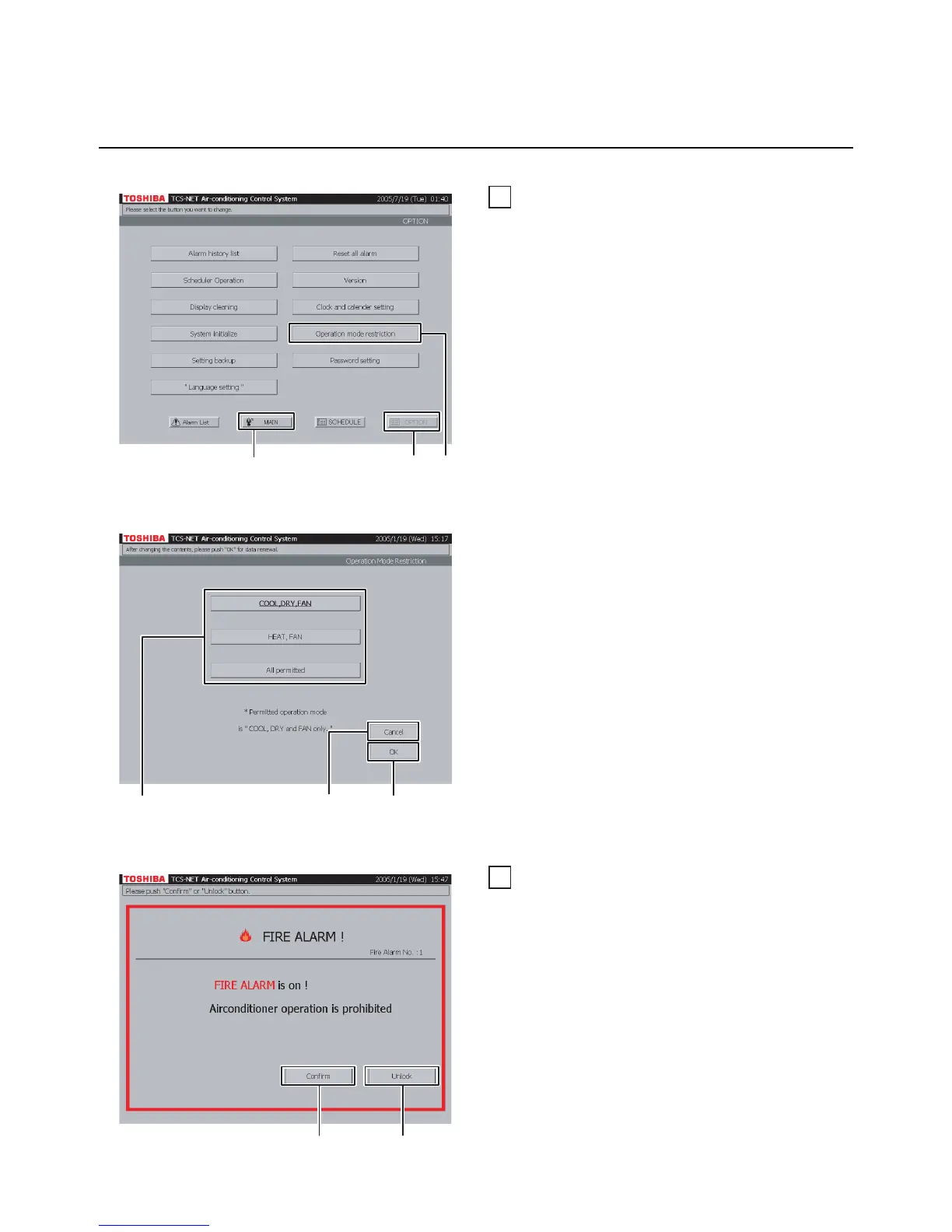
A Push [OPTION]. The Menu screen (Fig. 44-1)
appears.
To return to the Monitoring screen, push [MAIN].
B Push [Operation mode restriction]. The
Operation Mode Select screen (Fig. 44-2)
appears.
Fig. 44-1 Menu Screen
Fig. 44-2 Operation Mode Select Screen
C Push [COOL,DRY,FAN] to permit the COOL,
DRY and FAN only modes.
Push [HEAT, FAN] to permit the HEAT and FAN
only modes.
When permitting all operation modes, push [All
permitted].
D Confirm the setting, and then push [OK].
To cancel the setting, push [Cancel].
45
Fire alarm indication
Interlocking with a fire alarm, this system indicates
a fire alarm message in the event of fire.
In this case, operation of all air conditioners is
prohibited automatically.
A Push [Confirm] to return to the previous screen.
B Push [Unlock] to reset the operation prohibition
setting.
AB
To return to Monitoring screen (A)
To cancel setting (D)
CD
BA


 To Next Page
 Loading...