65-EN
ENGLISH
46
Operation restrictions by password
Used when operating an air conditioner until you
enter a password to log in the system or when
prohibiting the setting and checking performed
using [SCHEDULE] and [OPTION] buttons.
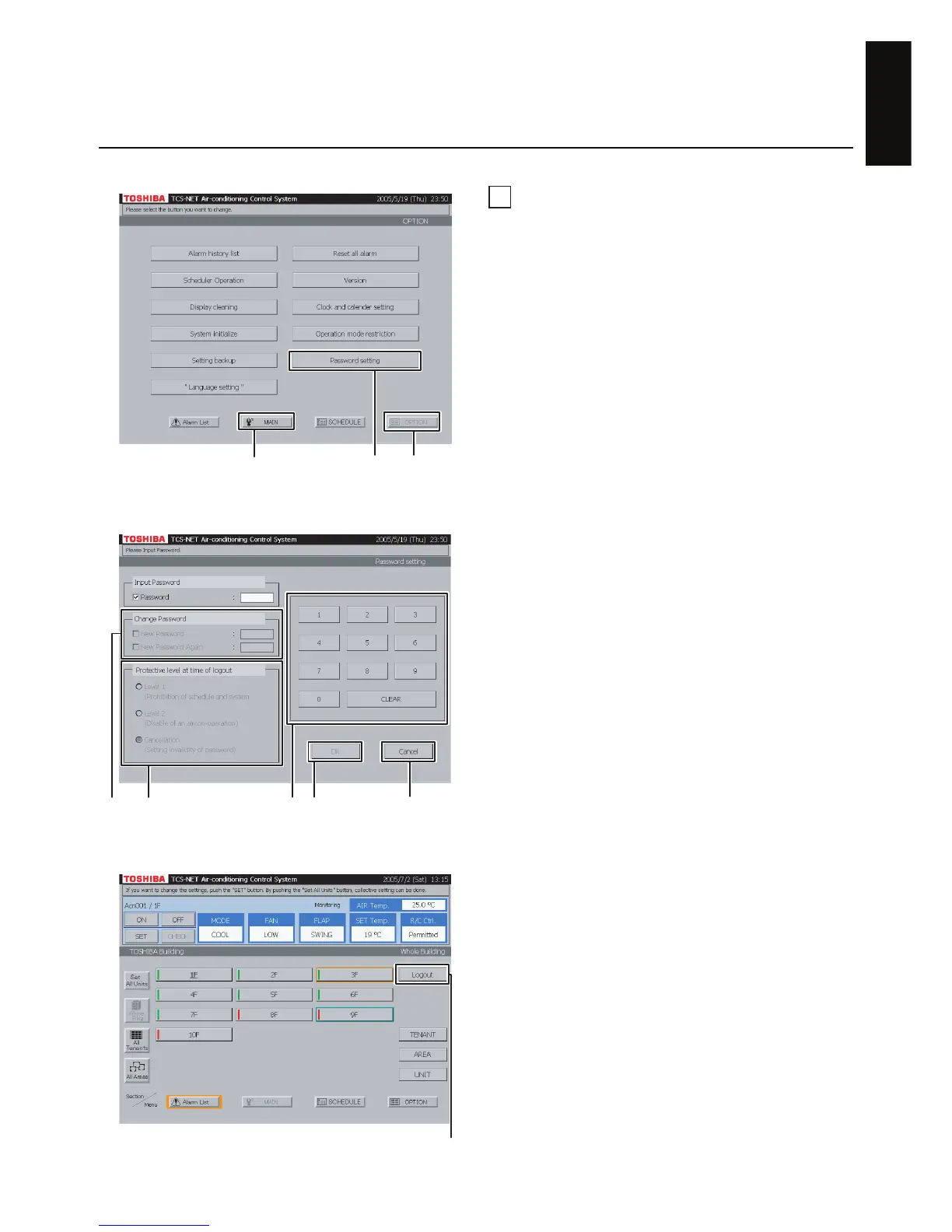
A Push [OPTION]. The Menu screen (Fig. 46-1)
appears.
To return to the Monitoring screen, push [MAIN].
B Push [Password setting]. The Password Setting
Screen (Fig. 46-2) appears.
C Enter a password consisting of four-digit
numbers using a numeric button.
The initialized password is “1048”.
D To change a password, click the New Password
check box and then enter a new password
consisting of four-digit numbers.
Click the New Password Again check box and
enter the same password again.
E Select the range of the function to be limited
during logout operation.
Level 1 : Prohibits the setting and checking
performed using [SCHEDULE]
and [OPTION] buttons.
(An air conditioner can be set and
operated in this case.)
Level 2 : Prohibits the setting and operation
of an air conditioner and the
setting and checking performed
using [SCHEDULE] and
[OPTION] buttons.
Cancellation : Limits no function by a password.
F Check the contents of setting and push [OK].
To cancel the setting, push [Cancel].
G Push [Main] to return to the Monitor Screen (Fig.
46-3) and push [Logout]. The operation in the
selected range (Level 1 or Level 2) cannot be
done in this case. [Logout] is then switched to
[Login].
Push [Login]. The Password Input Screen (Fig.
46-4) appears.
The Password Input Screen (Fig. 46-4) appears
when operation is not done for five minutes even
if you do not push [Logout]. (Automatic logout)
Fig. 46-2 Password setting screen
Fig. 46-3 Monitor screen
Fig. 46-1 Menu Screen
AB
To return to Monitoring screen (A)
DE FC
To cancel setting (
F
)
G


 To Next Page
 Loading...