35-EN
ENGLISH
20
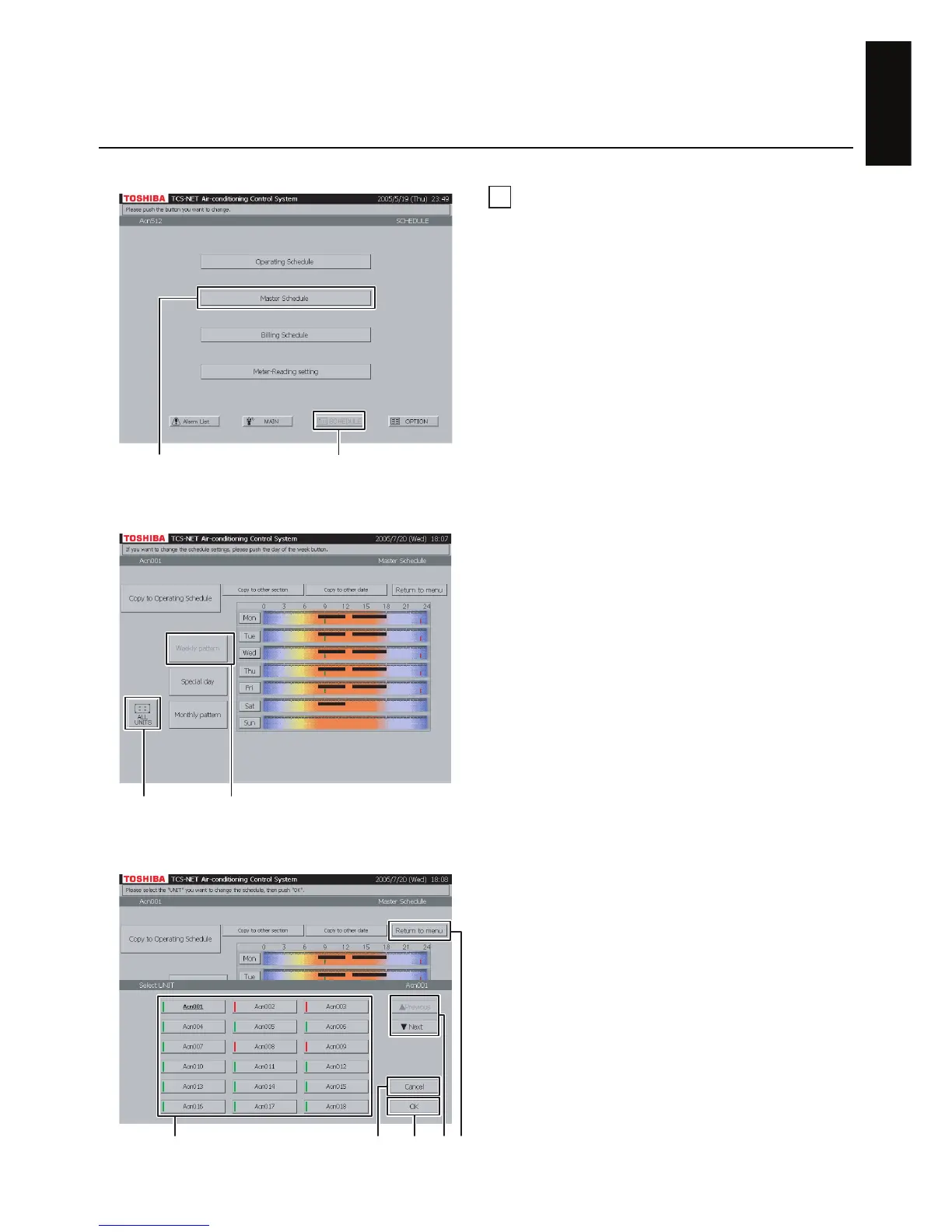
Checking weekly pattern
A Push [SCHEDULE].
The Schedule screen (Fig. 20-1) appears.
B Push [Master Schedule].
The screen (Fig. 20-2) appears.
C Push [Weekly pattern]. (This button is active at
the time when this screen opens.)
Black line ········ ON to OFF
Green line ······· ON only
Red line ·········· OFF only
D To check schedules of other air conditioners,
push [ALL UNITS].
The screen (Fig. 20-3) appears.
E Choose an air conditioner whose schedule you
want to check.
F When the unit list ranges over two or more
pages, use the [▲ Previous] and [▼ Next]
buttons.
If you choose no air conditioner, push [Cancel].
G Push [OK]. The schedule of the selected air
conditioner is displayed.
H Push [Return to menu] to return to the Schedule
screen (Fig. 20-1).
Fig. 20-1 Schedule Screen
Fig. 20-2 Checking Weekly Pattern
Fig. 20-3 Selection from All Units
Checking/Setting Master Schedule
AB
CD
When not selecting (F)
FHGE


 To Next Page
 Loading...