EN-24
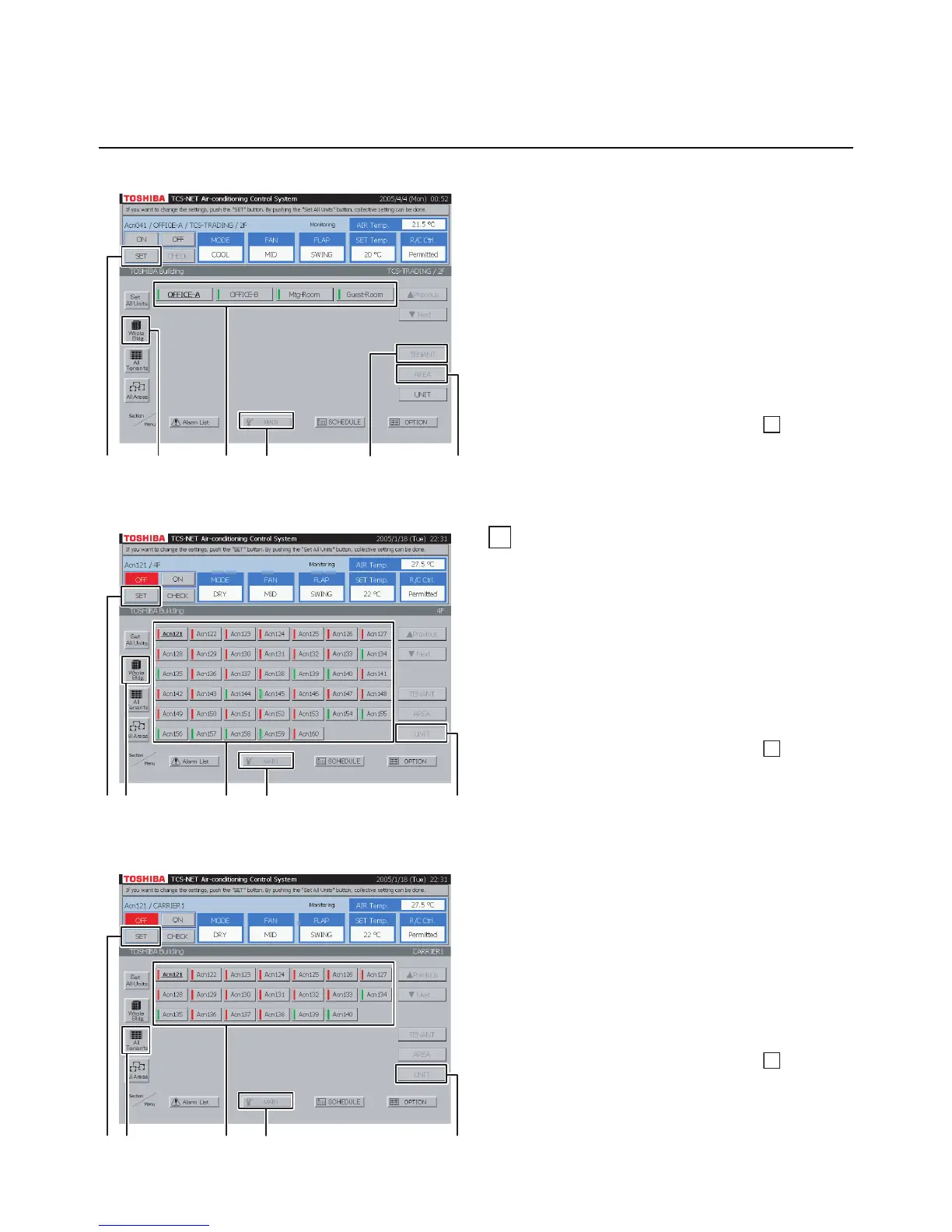
<Choose an area from tenant by block>
A Select [MAIN].
B Select [Whole Bldg].
Choose a block to which tenants belong.
C Select [TENANT].
Choose a tenant to which areas belong.
D Select [AREA].
E Choose an area for which you want to set air
conditioners.
F Push [SET].
For how to set air conditioners, see
14
Settings
for Air Conditioner Operation.
12
Setting by air conditioner
<Choose an air conditioner from block>
A Select [MAIN].
B Select [Whole Bldg].
Choose a block.
C Select [UNIT].
D Choose an air conditioner which you want to
set.
E Push [SET].
For how to set air conditioners, see
14
Settings
for Air Conditioner Operation.
Fig. 12-1 Choose from Block
<Choose an air conditioner from tenant>
A Select [MAIN].
B Select [All Tenants].
Choose a tenant.
C Select [UNIT].
D Choose an air conditioner which you want to
set.
E Push [SET].
For how to set air conditioners, see
14
Settings
for Air Conditioner Operation.
Fig. 12-2 Choose from Tenant
Setting Air Conditioners (continued)
HOW TO OPERATE (continued)
Fig. 11-4 Choose Area from Tenant by Block
A
B
C
E
D
F
A
D
C
B
E
A
D
C
B
E


 To Next Page
 Loading...