43-EN
ENGLISH
26
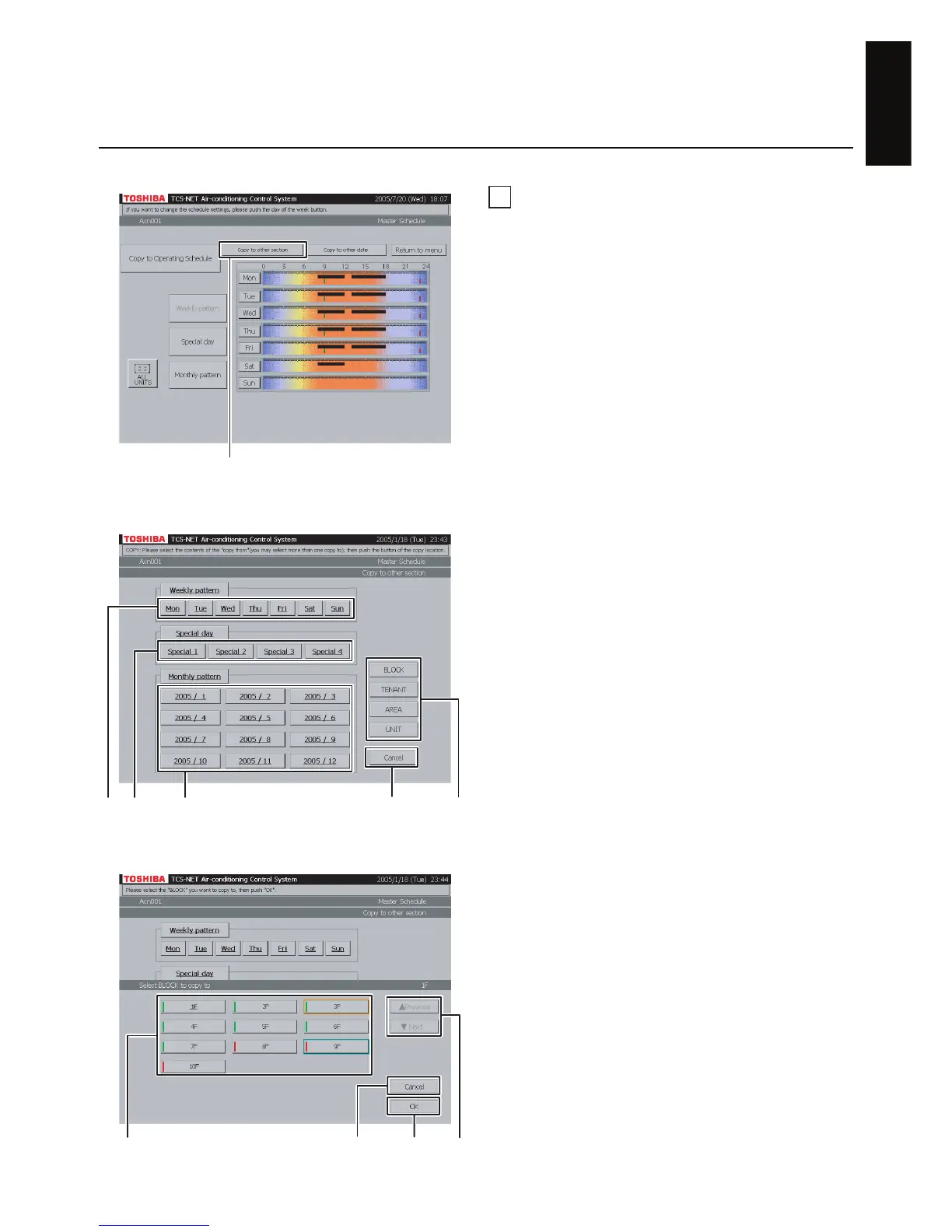
Copy to other section
A Push [Copy to other section].
The screen (Fig. 26-2) appears.
<Copying weekly pattern>
B Choose one or more days of the week you want
to copy ([Mon] to [Sun]).
To choose all days of the week, push [Weekly
pattern].
<Copying special-day pattern>
C Choose one or more special days you want to
copy ([Special 1] to [Special 4]).
To choose all special days, push [Special day].
<Copying monthly schedule>
D Choose one or more months you want to copy
([2005 / 1] to [2005 / 12]).
To choose all months, push [Monthly pattern].To
cancel the selection, push the selected buttons.
E Push [BLOCK] to copy pattern/schedule to a
block. A block list is displayed (Fig. 26-3).
· Push [TENANT] to copy pattern/schedule to a
tenant. A tenant list is displayed (Fig. 26-4).
· Push [AREA] to copy pattern/schedule to an
area. An area list is displayed (Fig. 26-5).
· Push [UNIT] to copy pattern/schedule to another
air conditioner. A unit list is displayed (Fig. 26-6).
F Choose a copy destination from the list.
G When the list ranges over two or more pages,
use the [▲ Previous] and [▼ Next] buttons.
H Push [OK] to perform the selected copy.
If you cancel the selected copy on the screen of
Fig. 26-3, 26-4, 26-5, or 26-6, push [Cancel].
The screen of Fig. 26-2 reopens.
If you cancel the selected copy on the screen of
Fig. 26-2, push [Cancel]. The Master Schedule
Check screen (Fig. 26-1) reopens.
Fig. 26-2 “Copy to Other Section” Screen
Fig. 26-3 Block Select Screen
Fig. 26-1 Master Schedule Check Screen
A
BC D E
When not copying (H)
F
H
G
When not copying (H)


 To Next Page
 Loading...