71-EN
ENGLISH
50
Setting of display language
The display language on the screen can be
changed to English, French, Germany, Italian,
Spanish, and Chinese.
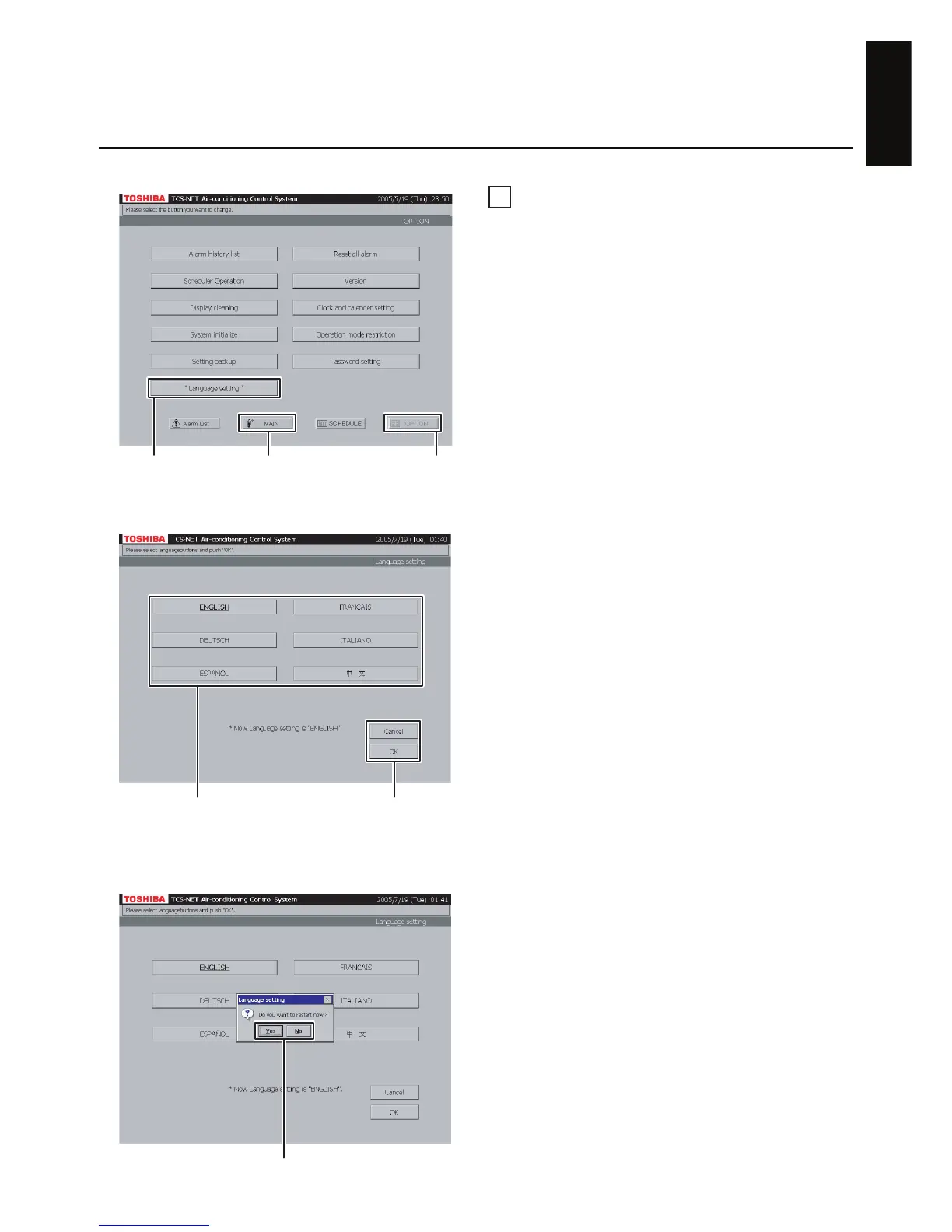
A Push [OPTION]. The Menu screen (Fig. 50-1)
appears.
To return to the Monitoring screen, push [MAIN].
B Push [“Language setting”] to display the
Language Setting Screen (Fig. 50-2).
Fig. 50-2 Language setting screen
Fig. 50-3 Confirmation Message for Restart
screen
Fig. 50-1 Menu Screen
AB
To return to Monitoring screen (A)
DC
E
E Push [Yes] to start restart.
Push [No] to return to the Menu Screen (Fig. 50-
1) without restart.
The current language is switched to the
language selected during restart next time.
C Select the language to be used.
D Check the contents of setting and push [OK].
Push [OK] to display the Confirmation Message
of Restart screen (Fig. 50-3).
To cancel the setting, push [Cancel].


 To Next Page
 Loading...