63
Recording
Playback EditingIntroduction Connections
Basic Setup
Function Setup Others
EN
5
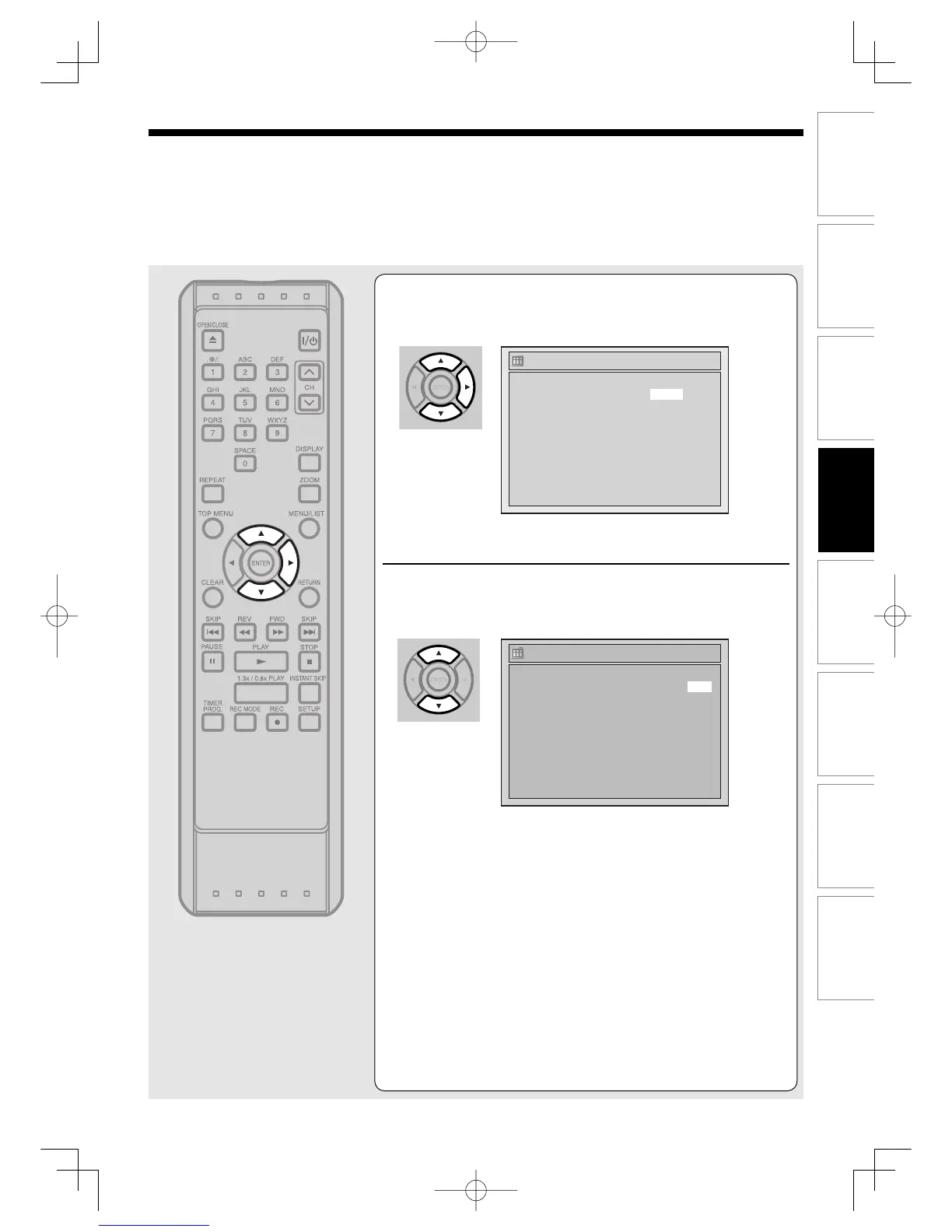
Using [K / L], select the channel number to
record. Press [B].
To record from external input, select L1 or L2, which is
found at the before channel 1.
6
Using [K / L], select a recording mode.
Refer to “Recording mode” on page 65.
If you choose “Auto”, the unit automatically selects the best
recording mode to make the best quality picture according to
the remaining disc space.
• This function works only on the 1 program.
• The recording may be cut short, when the available recording
space of the disc is too limited.
(Continued)
Timer Programming
2. ---
3. ---
4. ---
5. ---
6. ---
7. ---
8. ---
1. JAN/01 12:57AM 1:57AM CH 8
Date Start End CH Mode
Timer Programming
2. ---
3. ---
4. ---
5. ---
6. ---
7. ---
8. ---
1. JAN/01 12:57AM 1:57AM CH 8 Auto
Date Start End CH Mode
RecordingUD.indd63RecordingUD.indd63 2006/01/1116:28:382006/01/1116:28:38



 To Next Page