64
Recording
EN
Timer Recording (cont’d)
Notes
• If you have not set the clock yet:
A manual clock setting menu will appear instead of the Timer Programming list at step 1. Continue with step 4 in “Manual
Clock Setting” on page 41 before setting a timer programming.
• Press [s / B] to move the cursor to the left and the right in the Timer Programming list.
• After step 8, the recording will start immediately before the recording time you set.
7
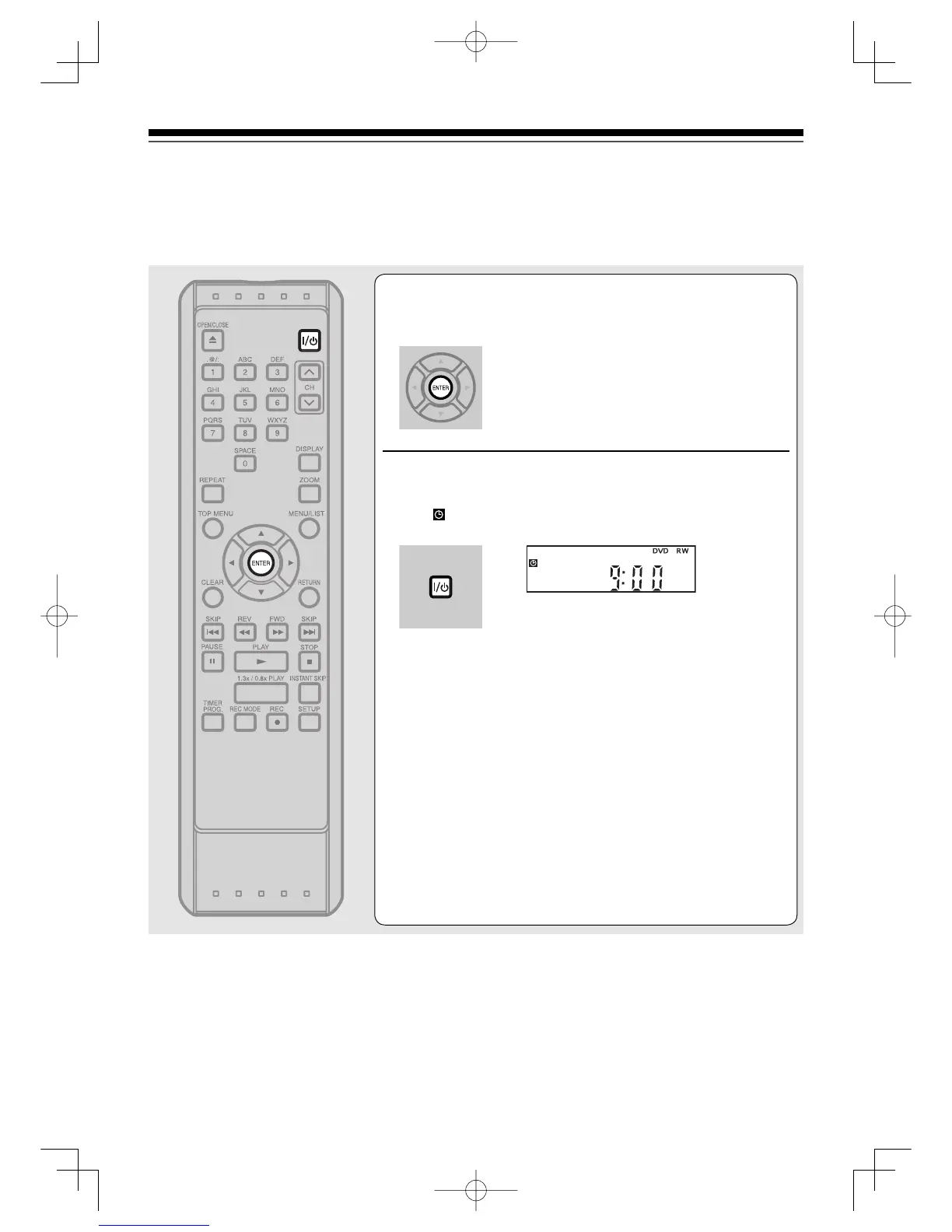
Press [ENTER] when information is entered.
Your program setting will be stored.
• To set another program, repeat steps 2 to 7.
• To exit, press [TIMER PROG.] or [SETUP].
• When two or more programs are overlapped,
“Overlap” and the overlapped program number
will appear on the TV screen.
8
Press [I/
ON/STANDBY] to go into the timer
standby mode.
indicator will appear on the front panel display, while this
unit waits to make the recording.
• Timer Recording will not work when the power is on.
• When power is on, programs registered for recording in Timer
Recording will be automatically cleared after the end time and
date have passed.
To stop the Timer Recording in process:
Press [STOP C] on the front panel of the unit.
[STOP C] on the remote control is not
effective.
RecordingUD.indd64RecordingUD.indd64 2006/01/1116:28:382006/01/1116:28:38



 To Next Page