34
Operation of display lamp brightness
adjustment
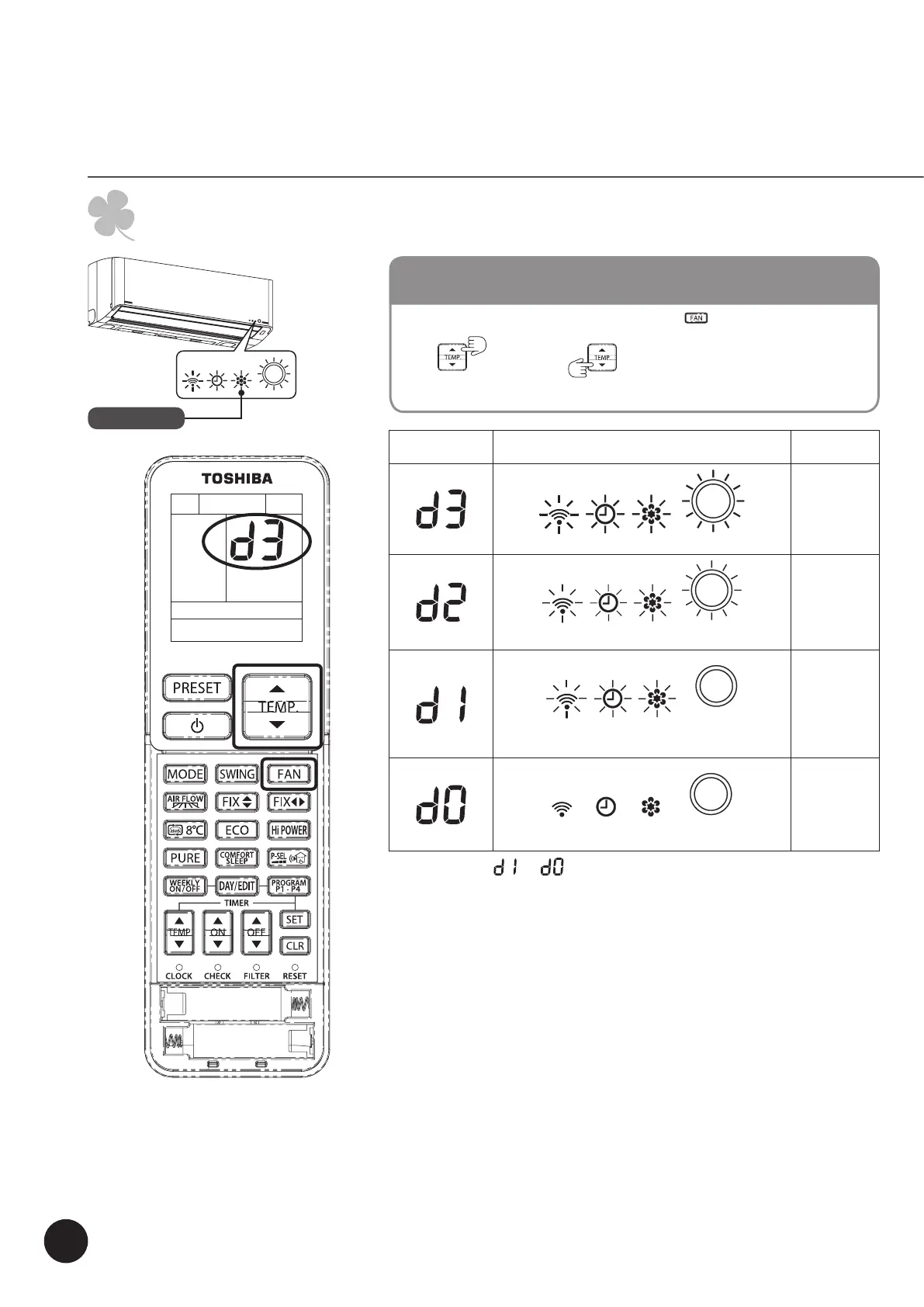
This function is used when it is necessary to decrease the display lamp brightness or turn it off.
Operation display
While operating (Auto, Cool, Heat or Dry), press and hold 5 seconds.
Press
Rise
or
Decrease
to adjust brightness which can be set at 4 levels or
to turn it off.
LAMP BRIGHTNESS ADJUSTMENT
Rremote control
LCD
Operation display Brightness
Lamp illuminates an operation with full brightness.
100%
Lamp illuminates an operation with 50% brightness.
50%
Lamp illuminates an operation with 50% brightness and the
operation mode lamp is turned off.
50%
All lamps are turned off.
All turned off
•
In the examples of and , the lamp illuminates for 5 seconds before going off.



 To Next Page