3. Driver Installation
3.1 Driver List
Folder/File File Description
<CD>:\B82.htm Drivers List
<CD>:\Common\Intel\Chipset Chipset Driver
<CD>:\Common\Intel\VGA\i85x VGA Driver
<CD>:\Common\Ac97_codec\Realtek\ALC202A Audio Driver
<CD>:\Common\Lan_driver\R8139_810x 10/100Mb LAN Driver
<CD>:\Common\Intel\USB20 USB 2.0 Driver
<CD>:\Common\Elo_Touch ELO Touch Screen Driver
The following procedures are for Windows 2000/XP, other platforms are similar.
3.2 Chipset Driver Installation
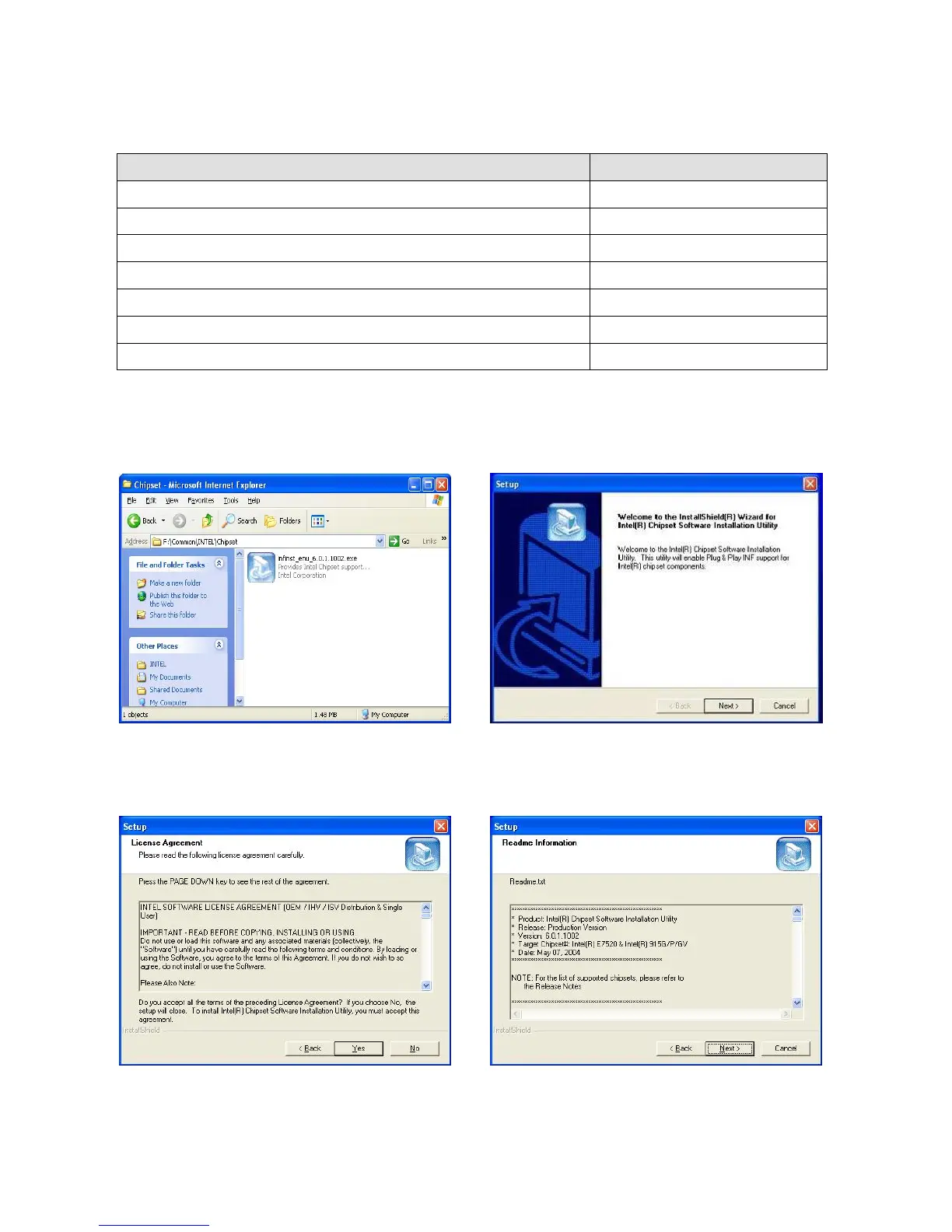
a. Double click “infinst_enu_6.0.1002” on
the My computer window.
b. Click the “Next” button on the
Welcome window.
c. Click the “Yes” button on the License
Agreement window.
d. Click the ”Next” button on the Readme
Information window.
10


 To Next Page