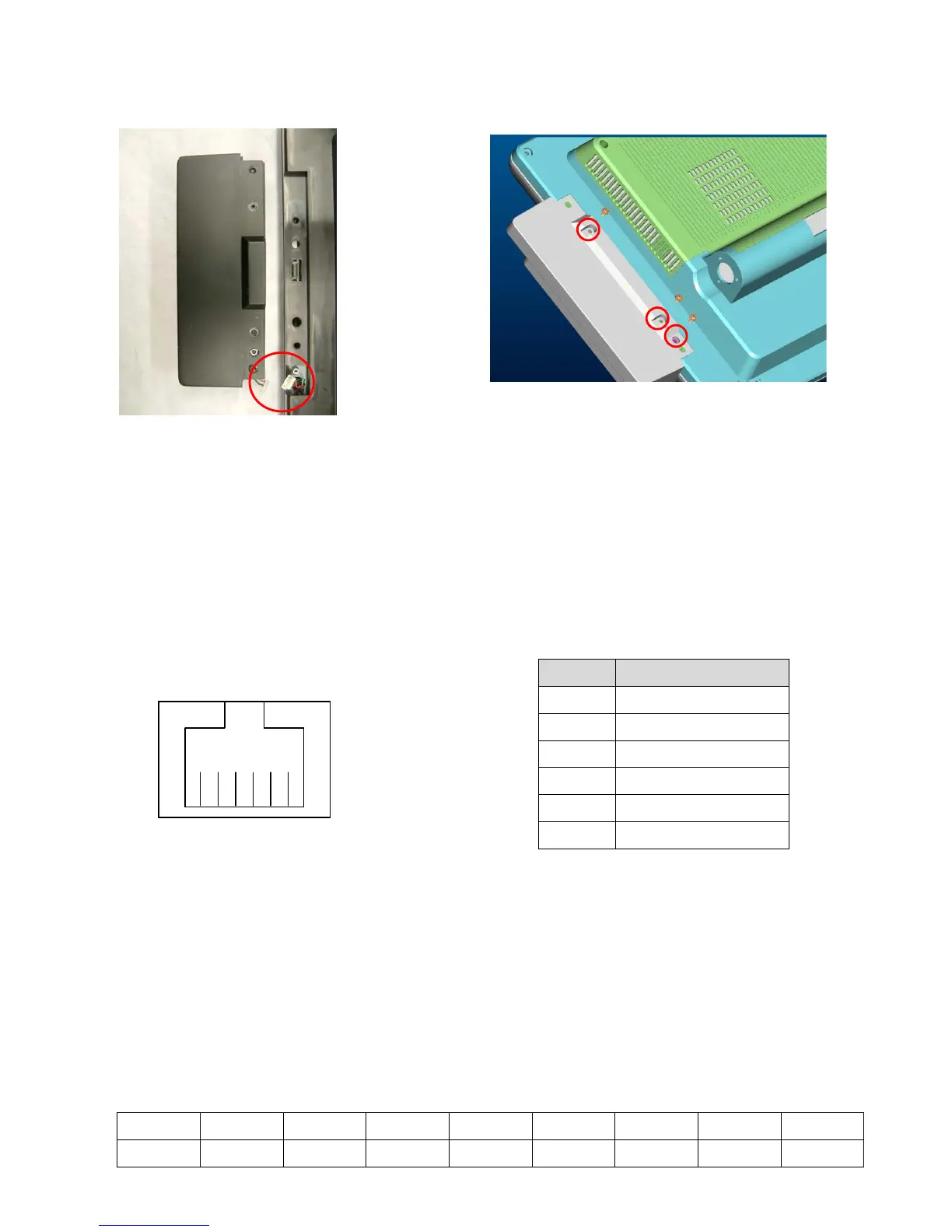
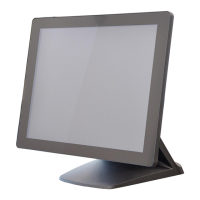
4. Peripherals Installation
4.1 Biometric Magnetic Stripe Reader Installation
a. Plug-in the cables( 2) into the connectors on
the terminal.
b. Secure the screws(3) to fix the module
to the terminal.
4.2 Cash Drawer Installation
You can install a cash drawer through the cash drawer port. Please verify the pin
assignment before installation.
4.2.1 Cash Drawer Pin Assignment
Pin Signal
1 GND
6 1
4.2.2 Cash Drawer Controller Register
The Cash Drawer Controller use one I/O addresses to control the Cash Drawer.
The Cash Drawer Control Register and the Cash Drawer Status Register.
Register Location:
4B8h
Attribute:
Read / Write
Size:
8bit
BIT
BIT7 BIT6 BIT5 BIT4 BIT3 BIT2 BIT1 BIT0
Attribute
Reserved Reserved Reserved Read Reserved Reserved Write Write
2 DOUT bit0
3 DIN bit0
4 12V / 24V
5 DOUT bit1
6 GND
19


 To Next Page