Virtuo Floor Stand Guide
Installing the Virtuo Floor Stand
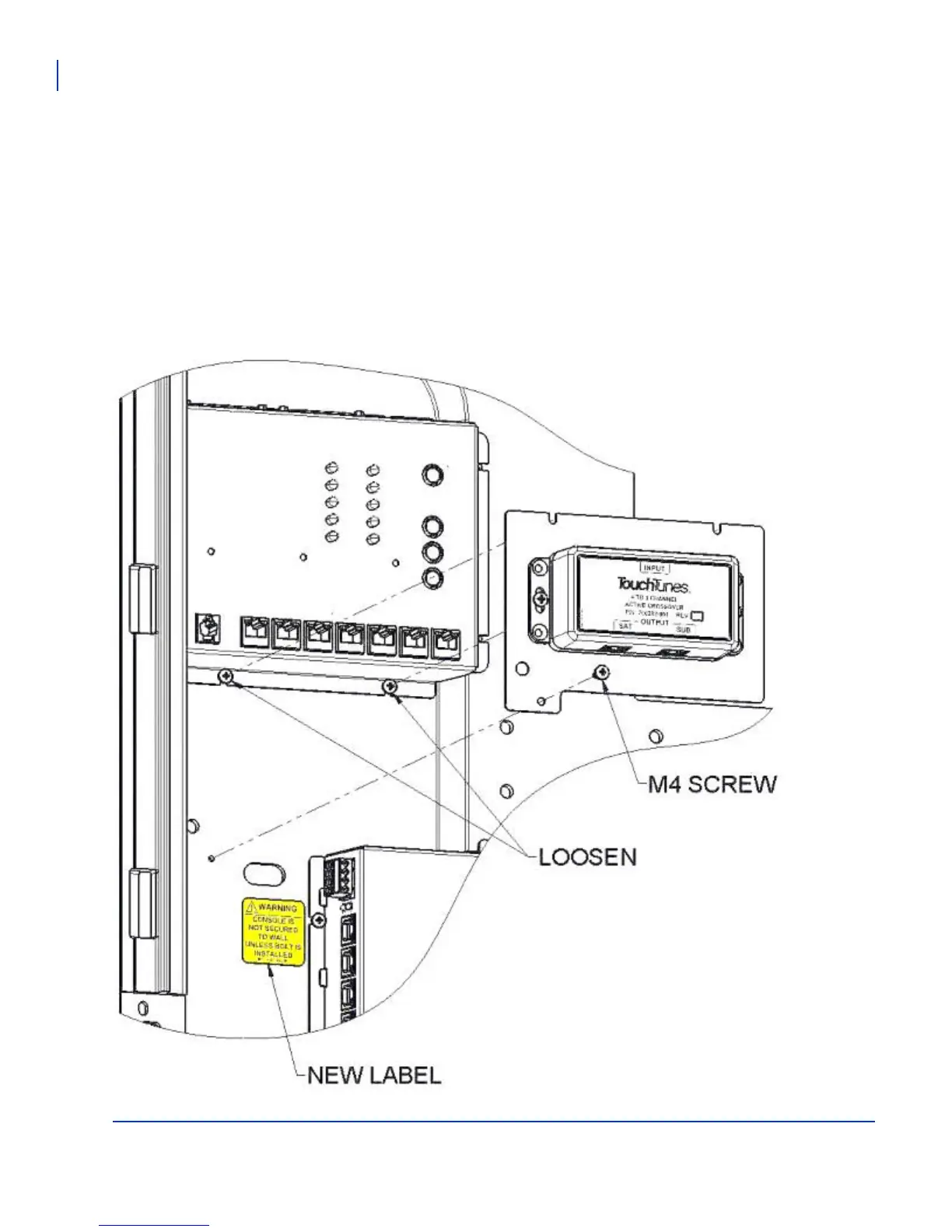
Installing the crossover box
30
Installing the crossover box
1. In the Virtuo, disconnect the audio CAT-5 cables from the I/O board Zones 1 and 2.
2. Loosen the two lower screws from the I/O board enclosure.
3. Insert the crossover bracket under the I/O board screws and fasten the lower left corner with the M4 screw
(included in the kit).
4. Tighten the I/O board screws.
5. Install the replacement warning label under the Virtuo mounting slot (included in the kit).
6. Attach the 7 inch CAT-5 cable (included in the kit) to Zone 1 of the I/O board and to the input of the crossover.
7. Attach the audio CAT-5 cables according to the diagram shown in Connecting the audio cables to the Virtuo.



 To Next Page