86
Chapter 12
Note:
If you use a wireless device to change the wireless settings, you will be disconnected when the settings are effective.
Please write down the new SSID and password for future use.
¾ To hide SSID :
1. Go to Basic > Wireless.
2. Select Hide SSID, and your SSID will not be broadcast. Your SSID won’t display when
you scan for local wireless network on your wireless device and you need to manually
join the network.
¾ To change the security option:
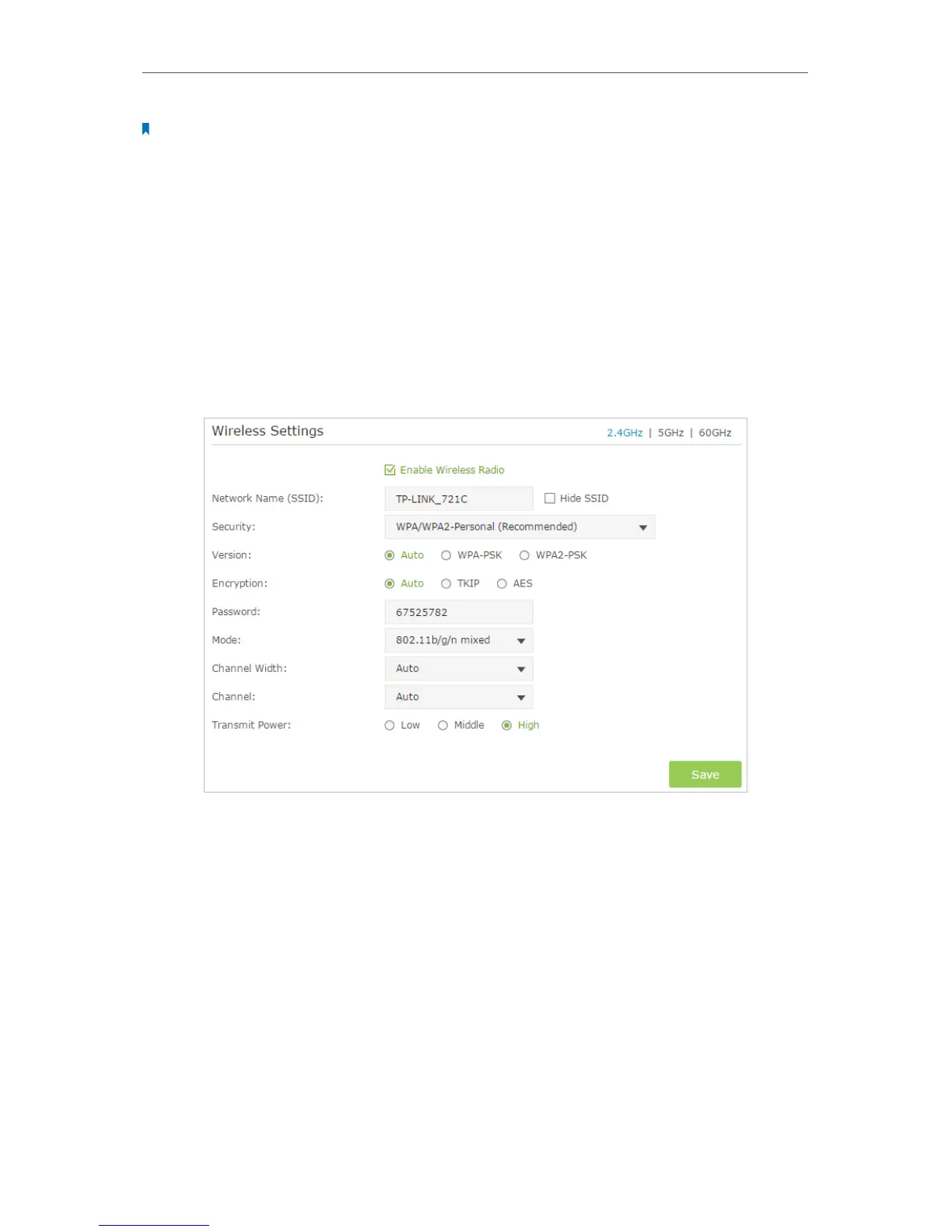
1. Go to Advanced > Wireless > Wireless Settings.
2. Select the wireless network 2.4GHz, 5GHz or 60GHz.
3. Select an option from the Security drop down list. The router provides several security
options. We recommend you don’t change the default settings unless necessary. If
you select other options, configure the related parameters according to the help
page.
In addition
• Mode - Select a transmission mode according to your wireless client devices.
802.11b/g/n mixed, 802.11g/n mixed or 802.11n only for 2.4GHz; and 802.11a/n/ac
mixed, 802.11n/ac mixed or 802.11ac only for 5GHz. It is recommended to just leave
it as default.
• Channel Width - Select a channel width (bandwidth) for 2.4GHz and 5GHz network.



 To Next Page