36
Chapter 8
USB Settings
• If the sharing password is different from the Windows password, the Windows system will be unable to
remember your credentials and you will always be required to enter the sharing password for USB access.
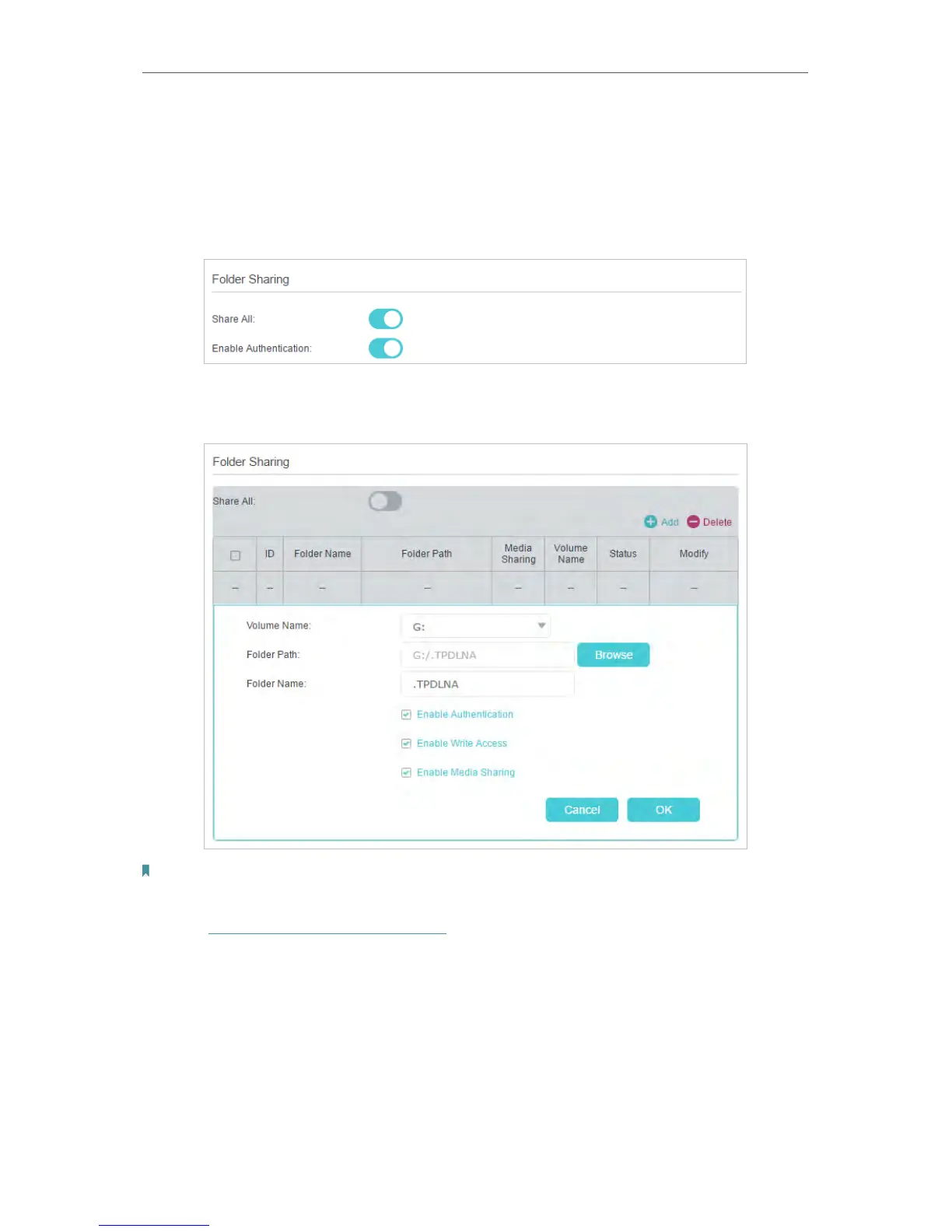
2. Specify the folder(s) to enable authentication.
• If you want to enable authentication for all folders, simply leave Share All
enabled.
• If you want to enable authentication for specific folders, disable Share All and
click Add to specify the folders.
Note:
Due to Windows credential mechanism, you might be unable to access the USB disk after changing Authentication
settings. Please log out from the Windows and try to access again. Or you can change the address of the USB disk by
referring to To Customize the Address of the USB Disk.
8. 2. Media Sharing
Media Sharing allows you to view photos, play music and watch movies stored on the
USB disk directly from DLNA-supported devices, such as your computer, tablet or
games console.












 To Next Page