80
Chapter 11
Customize Your Network Settings
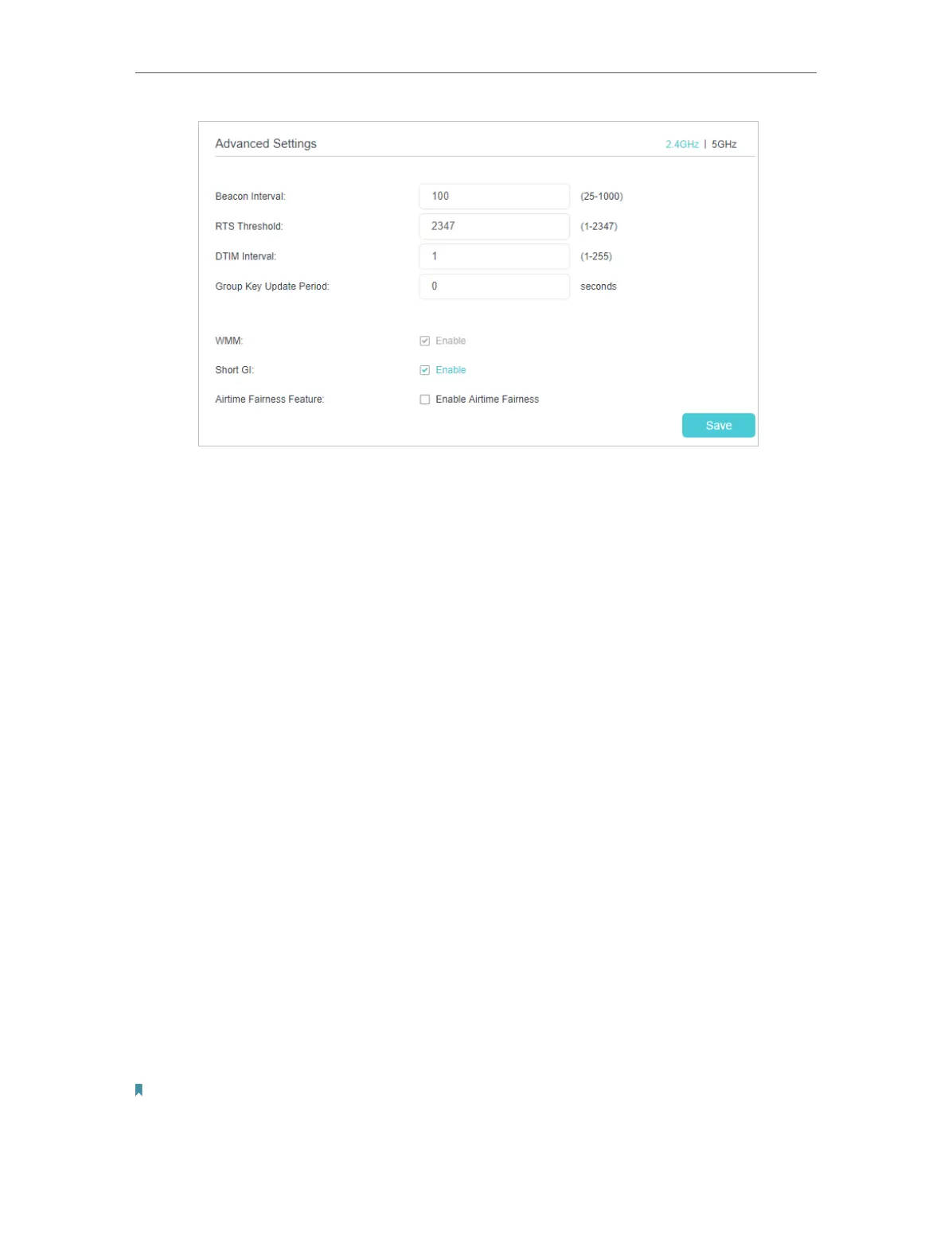
• Beacon Interval: Enter a value between 25 and 1000 in milliseconds to determine the
duration between which beacon packets are broadcast by the router to synchronize
the wireless network. The default is 100 milliseconds.
• RTS Threshold: Enter a value between 1 and 2347 to determine the packet size of
data transmission through the router. By default, the RTS (Request to Send) Threshold
size is 2347. If the packet size is greater than the preset threshold, the router sends
Request to Send frames to a particular receiving station and negotiates the sending
of a data frame, or else the packet will be sent immediately.
• DTIM Interval: Enter a value between 1 and 255 to determine the interval of the
Delivery Traffic Indication Message (DTIM). 1 indicates the DTIM Interval is the same
as Beacon Interval.
• Group Key Update Period: Enter the number of seconds to control the time interval
for the encryption key automatic renewal. The default is 0, indicating no key renewal.
• WMM: This feature guarantees the packets with high-priority messages being
transmitted preferentially. WMM is enabled compulsively under 802.11n or 802.11ac
mode. It is strongly recommended to enable WMM.
• Short GI: This feature is enabled by default and recommended to increase the data
capacity by reducing the Guard Interval (GI) time.
• Airtime Fairness Feature: Enable this feature when you want to sacrifice some of the
networking time from the slow devices, so that your faster devices can achieve better
quality of service.
• Multi-User MIMO Feature (5GHz): Enable Multi-User MIMO Feature. MU-MIMO relies
on beamforming.
Note:
If you are not familiar with the settings on this page, it’s strongly recommended that you keep the provided default
values; otherwise it may result in lower wireless network performance.



 To Next Page