19
Chapter 4
Set Up Internet Connection
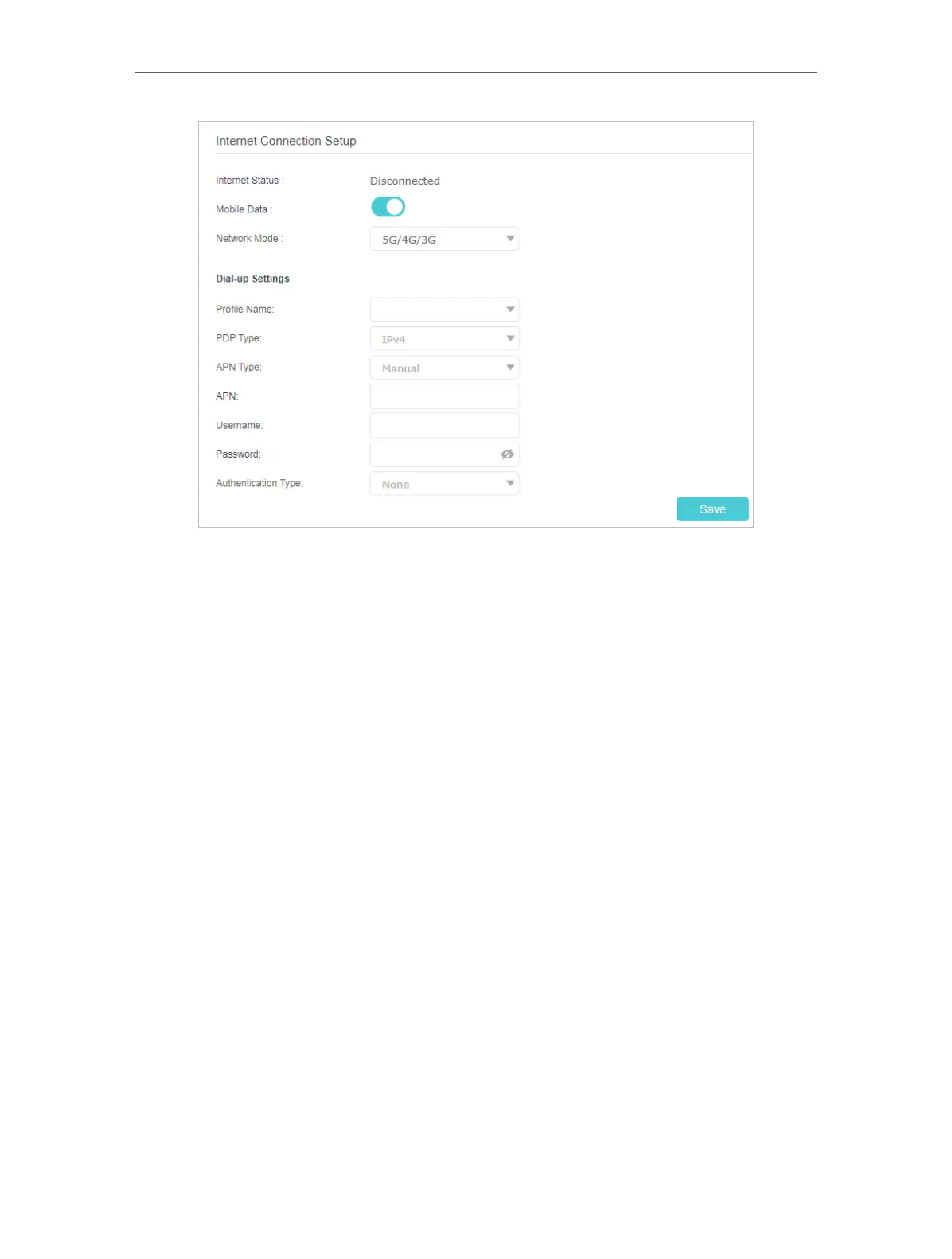
• Mobile Data - It is enabled by default. You can disable it to prohibit Internet access.
• Network Mode - The device supports three modes of network connection - 5G/4G/3G
, 4G/3G, 5G Only, 4G Only, and 3G. You can select network mode according to your
mobile network standard and the current network condition.
• Profile Name - The name of the profile you’ve selected.
• PDP Type - Select the type of your PDP (Packet Data Protocol).
• APN Type - Select the type of your APN (Access Point Name).
• APN - Access Point Name, provided by your ISP. You need to set APN only after
selecting the static APN type. You are recommended to keep the default value.
• Username/Password - Enter the username and password provided by your ISP. These
fields are case-sensitive. You are recommended to keep the default value.
• Authentication Type - Some ISPs need a specific authentication type, please confirm
it with your ISP or keep the default value.
NONE - No any authentication is needed.
PAP - Password Authentication Protocol. This protocol allows the device to establish
authentication with the peer using two handshakes. Select this option if the ISP requires
this authentication type.
CHAP - Challenge Handshake Authentication Protocol. This protocol allows the device
to establish authentication with the peer using three handshakes and checking the
peer identity periodically. Select this option if the ISP requires this authentication type.











 To Next Page