51
Chapter
8
Network Security
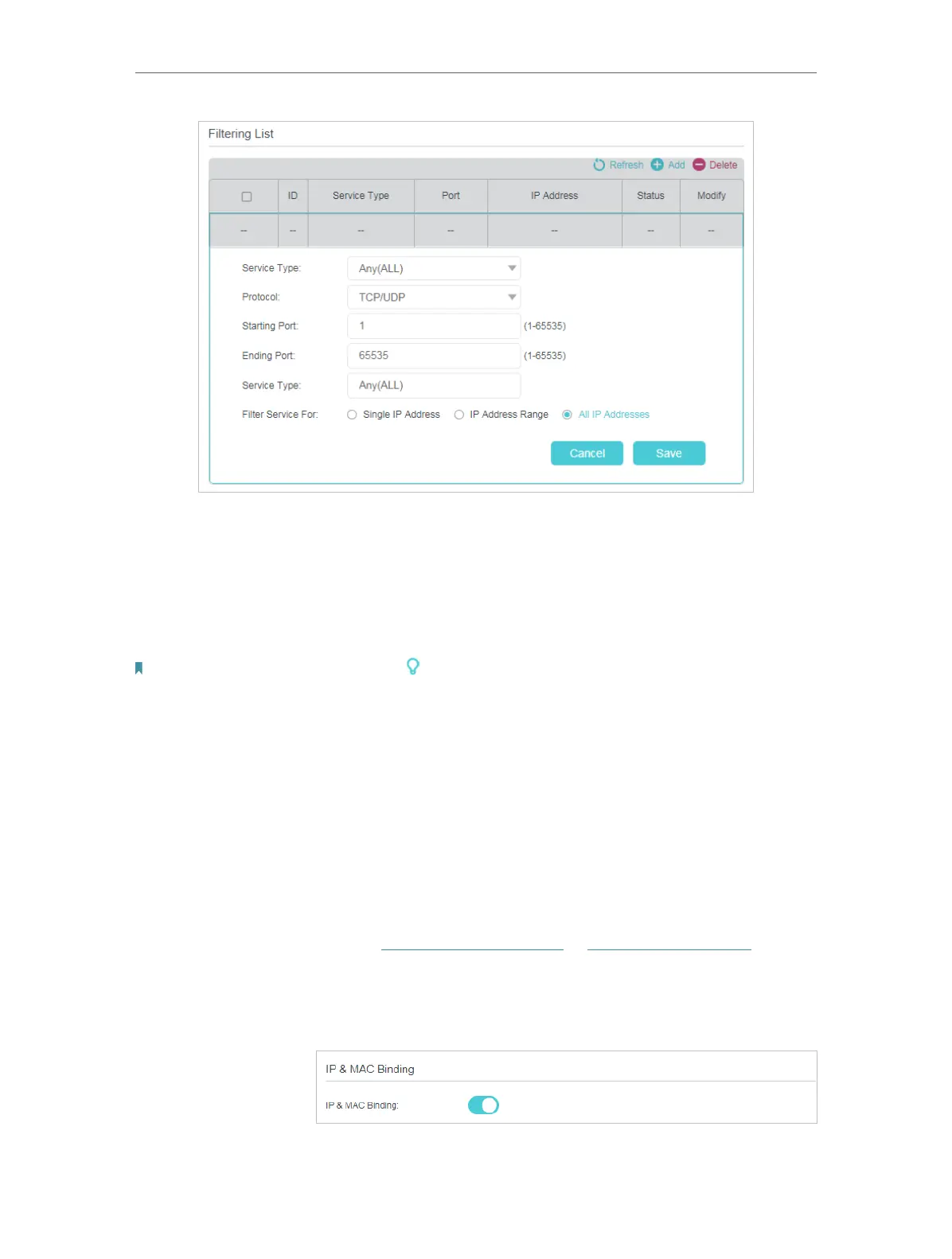
4. Select a Service Type from the drop-down list and the following four fields will be
automatically filled in. Select Custom when your desired service type is not listed,
and enter the information manually.
5. Specify the IP address(es) that this filtering rule will apply to.
6. Click Save to make the settings effective.
Note: If you want to disable an entry, click the icon.
8. 3. IP & MAC Binding
IP & MAC Binding, namely, ARP (Address Resolution Protocol) Binding, is used to bind
a network device’s IP address to its MAC address. This will prevent ARP spoofing and
other ARP attacks by denying network access to a device with a matching IP address in
the Binding list, but an unrecognized MAC address.
Prevent ARP spoofing and ARP attacks.
1. Visit http://tplinkmodem.net or http://192.168.254.1, and log
in with the password you set for the router.
2. Go to Advanced > Security > IP & MAC Binding, and enable
IP & MAC Binding.
3. Bind your device(s) according to your needs.
I want to:
How can I
do that?











 To Next Page