TC-W7960
300Mbps Wireless N DOCSIS 3.0 Cable Modem Router User Guide
Chapter 3. Log into the Modem Router
With a Web-based management page, it is easy to configure and manage the TC-W7960
300Mbps Wireless N DOCSIS 3.0 Cable Modem Router. The Web-based management page can
be used on any Windows, Macintosh or UNIX OS with a Web browser, such as Microsoft Internet
Explorer, Mozilla Firefox or Apple Safari.
Set up the TCP/IP Protocol in "Obtain an IP address automatically" mode on your PC. If you
need instructions as to how to do this, please refer to Appendix B: Trouble shooting
.
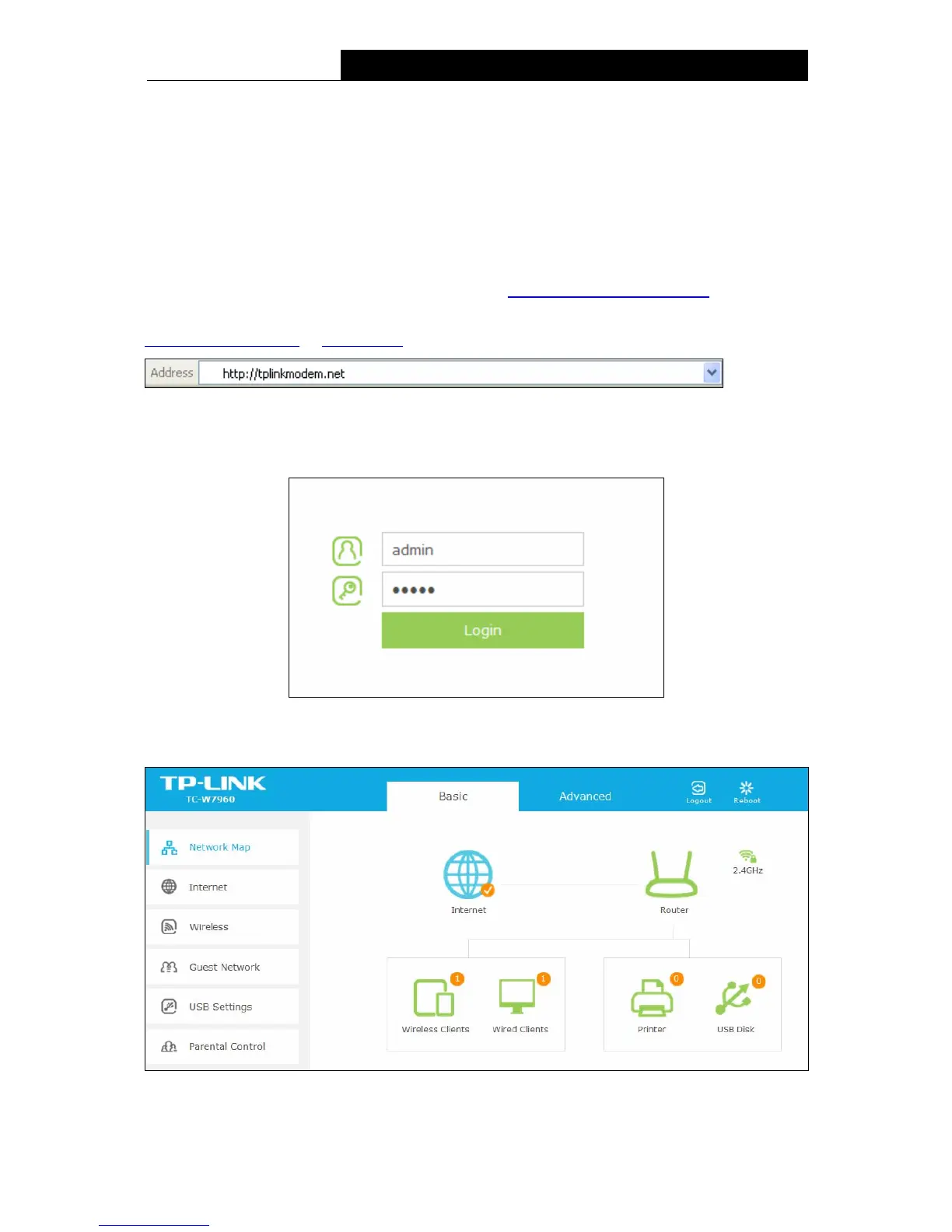
To access the configuration utility, open a web-browser and type the default address
http://tplinkmodem.net/
or 192.168.1.1 in the address field of the browser.
Figure 3-1
After a moment, a login window will appear. Enter admin for the Username and Password, both in
lower case letters. Then click the Login button or press the Enter key.
Figure 3-2
After your successful login, you will see the screen as shown below.
Figure 3-3
9


 To Next Page
 Loading...