TC-W7960
300Mbps Wireless N DOCSIS 3.0 Cable Modem Router User Guide
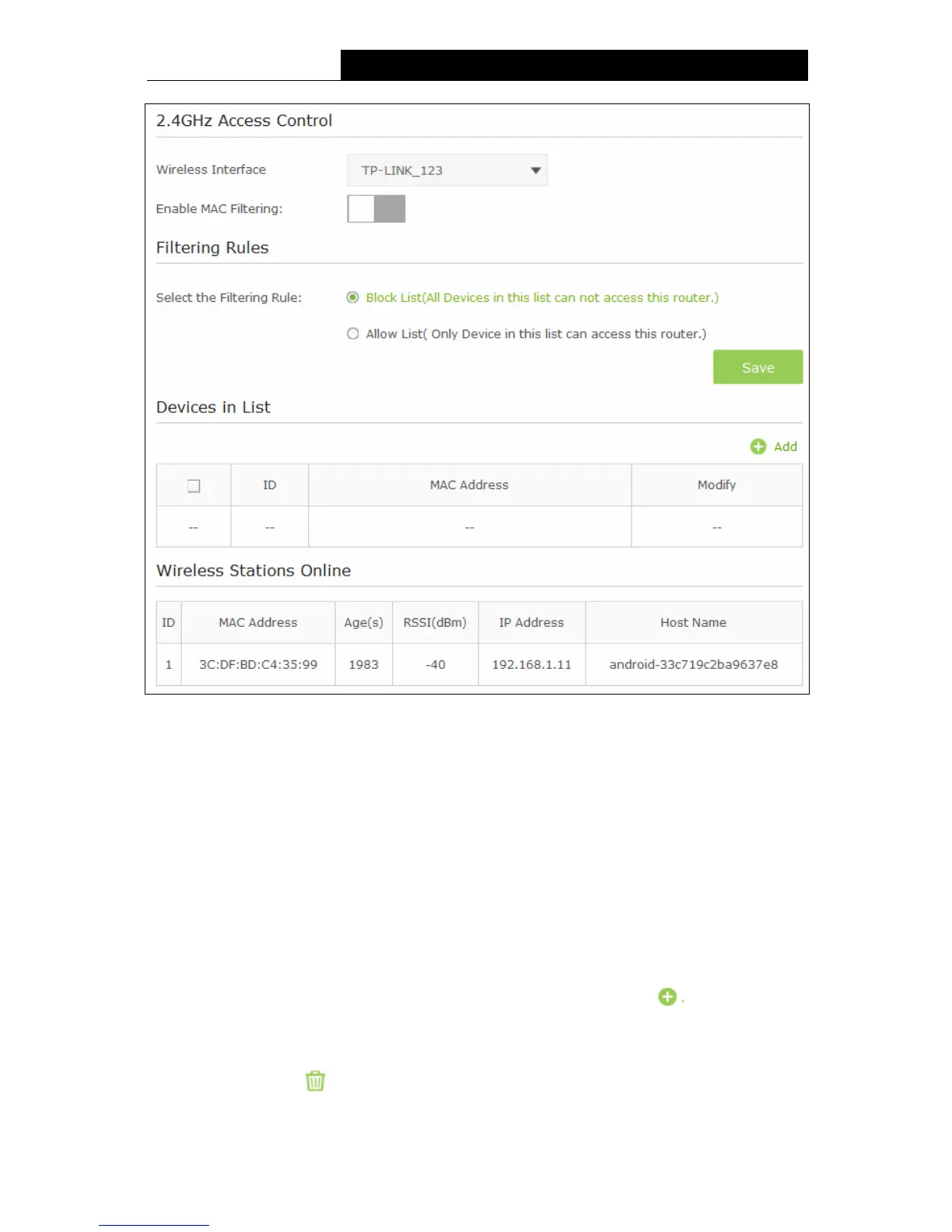
Figure 5-20
2.4GHz Access Control:
Wireless Interface - Select an available wireless interface from the drop-down list.
Enable MAC Filtering- The switch for the MAC Filtering. If you turn on this button, the field
will become green and you can filter wireless users by MAC Address.
Filtering Rules:
Select the Filtering Rule - You can select either of Block List or Allow List as the MAC
filtering rule.
Click the Save button to save the settings.
Devices in List:
Add - You can add a new device for the MAC Filtering rule by clicking Add button.
MAC Address - This field displays the MAC address of the wireless station that cannot
access this router/can access this router.
Modify - Click the icon to delete this entry.
To add a MAC Address Filtering entry:
44


 To Next Page
 Loading...