TC-W7960
300Mbps Wireless N DOCSIS 3.0 Cable Modem Router User Guide
Figure 4-2
1) Dynamic IP
Choose Dynamic IP in the drop-down list, the modem router will be able to obtain IP network
information dynamically from a DHCP server provided by your ISP.
Figure 4-3
Click the Apply button to save the settings.
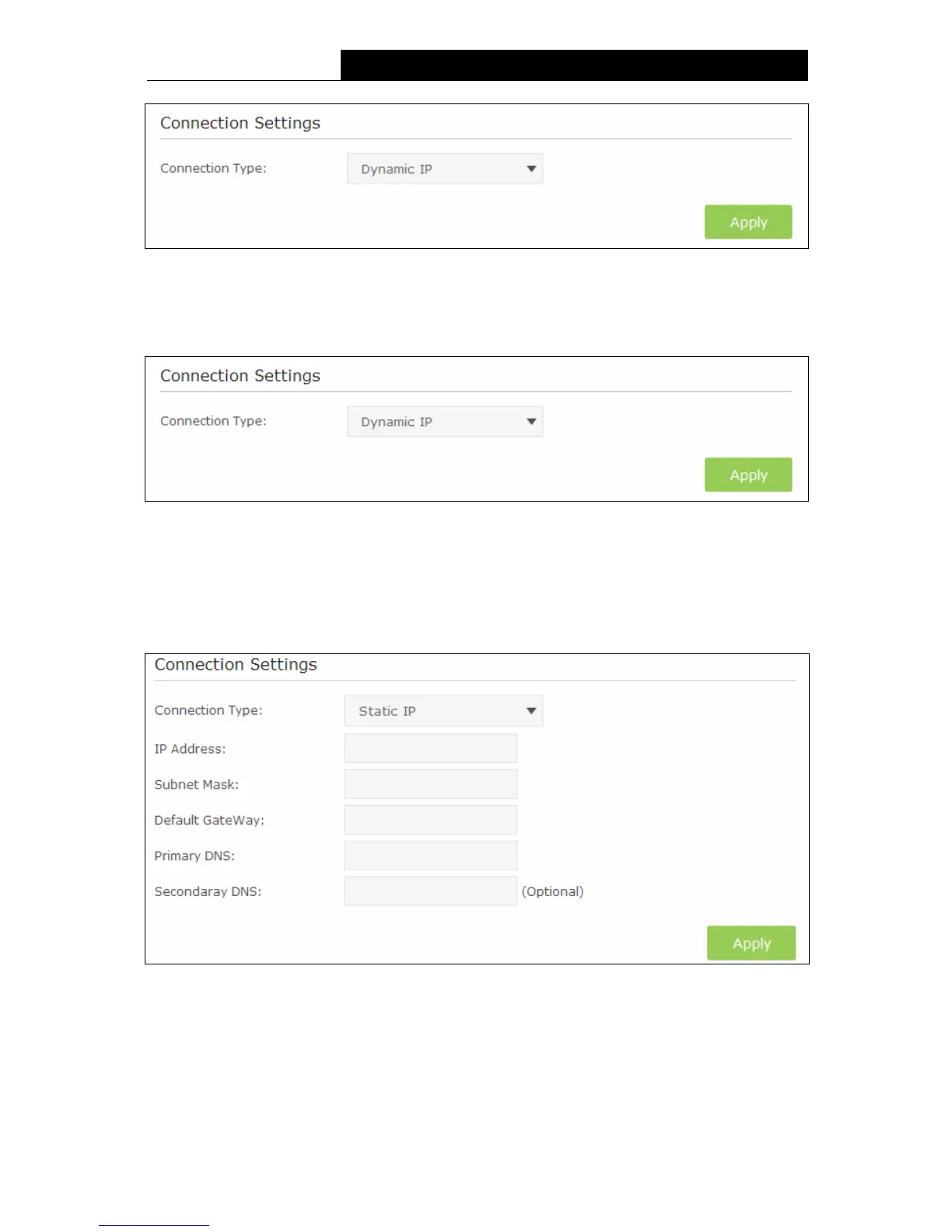
2) Static IP
Choose Static IP in the drop-down list if your ISP provides static IP information to you. You should
set static IP address, Subnet mask, and gateway address in the screen below.
Figure 4-4
IP Address - Enter the IP address in dotted-decimal notation provided by your ISP.
Subnet Mask - Enter the subnet Mask in dotted-decimal notation provided by your ISP,
usually is 255.255.255.0.
Default Gateway - Enter the gateway IP address in dotted-decimal notation provided by your
ISP.
11


 To Next Page
 Loading...