TC-W7960
300Mbps Wireless N DOCSIS 3.0 Cable Modem Router User Guide
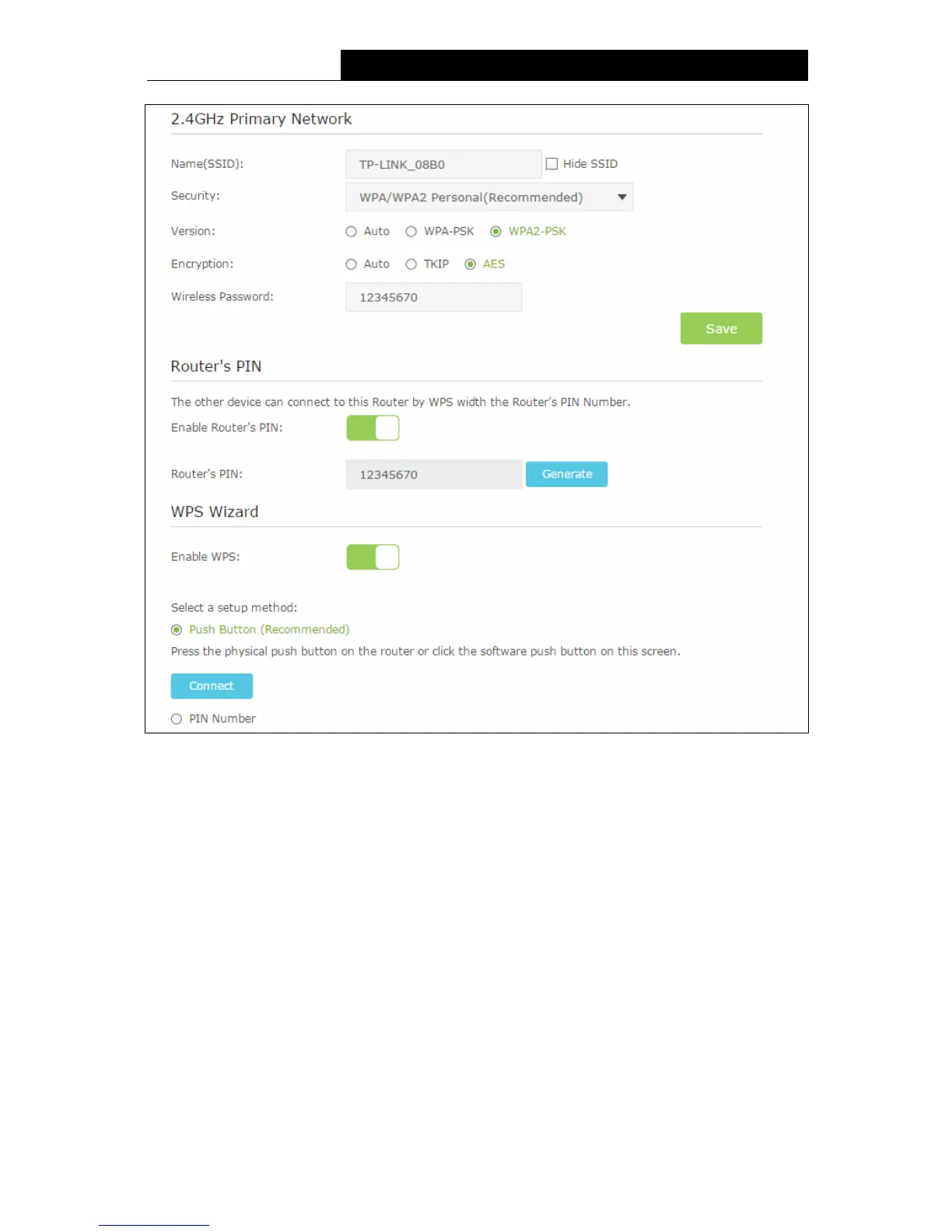
Figure 5-15
2.4GHz Primary Network:
Name(SSID) – Create a name (up to 32 characters) for your 2.4GHz wireless network. The
default SSID is set to be TP-LINK_XXXX.
Hide SSID – If you want to hide the SSID of your wireless network from the Wi-Fi network,
you should check the box.
Security – There are four wireless security modes supported by the modem router: No
Security, WPA/WPA2 Personal (Recommended), WPA/WPA2 Enterprise, WEP. You can
choose one of them from the drop-down list.
1) No Security: If you do not want to use wireless security, choose No Security. But it’s
recommended to use wireless security.
2) WPA-PSK/WPA2-PSK Personal(Recommended):
Version –You can choose the version of the WPA-PSK/WPA2-PSK security by selecting
Auto, WPA-PSK or WPA2-PSK. The default setting is WPA2-PSK.
38












 To Next Page