TC-W7960
300Mbps Wireless N DOCSIS 3.0 Cable Modem Router User Guide
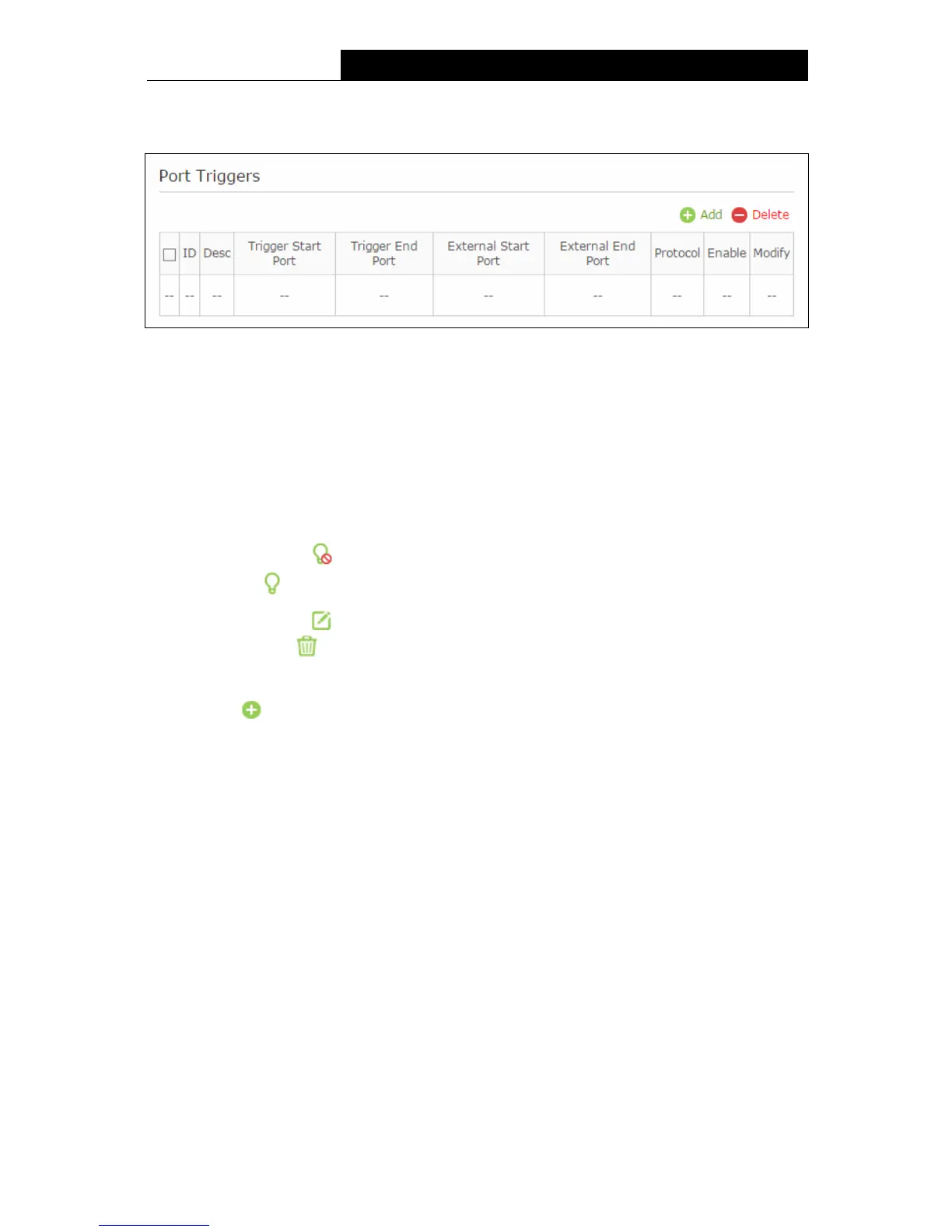
Internet gam
es, video conferencing, Internet telephoning and so on. Port Triggering is used for
some of these applications that cannot work with a pure NAT modem router.
Figure 5-34
Triggering Start/End Port - The start port/end port for outgoing traffic. An outgoing
connection using this port will trigger this rule.
External Start/End Port - The port used by the remote system when it responds to the
outgoing request. A response using one of these ports will be forwarded to the PC which
triggered this rule.
Protocol - The protocol used for External Port, either TCP, UDP, or ALL (all protocols
supported by the router).
Enable – Click the icon to enable the function. If this function has taken effect, the icon
will become .
Modify – Click the icon to edit the corresponding entry. If you want to delete this entry,
you can click the
icon.
To add a new rule, follow the steps below.
1. Click the
Add button.
2. Enter the number of the Triggering Start/End and External Start/End Port.
3. Select the protocol used for this application in the Protocol drop-down list, either TCP, UDP,
or Both.
4. Enable the Enable this entry checkbox.
5. Click the OK button.
54


 To Next Page
 Loading...