TD-W8950ND 150Mbps Wireless N ADSL2+ Modem Router User Guide
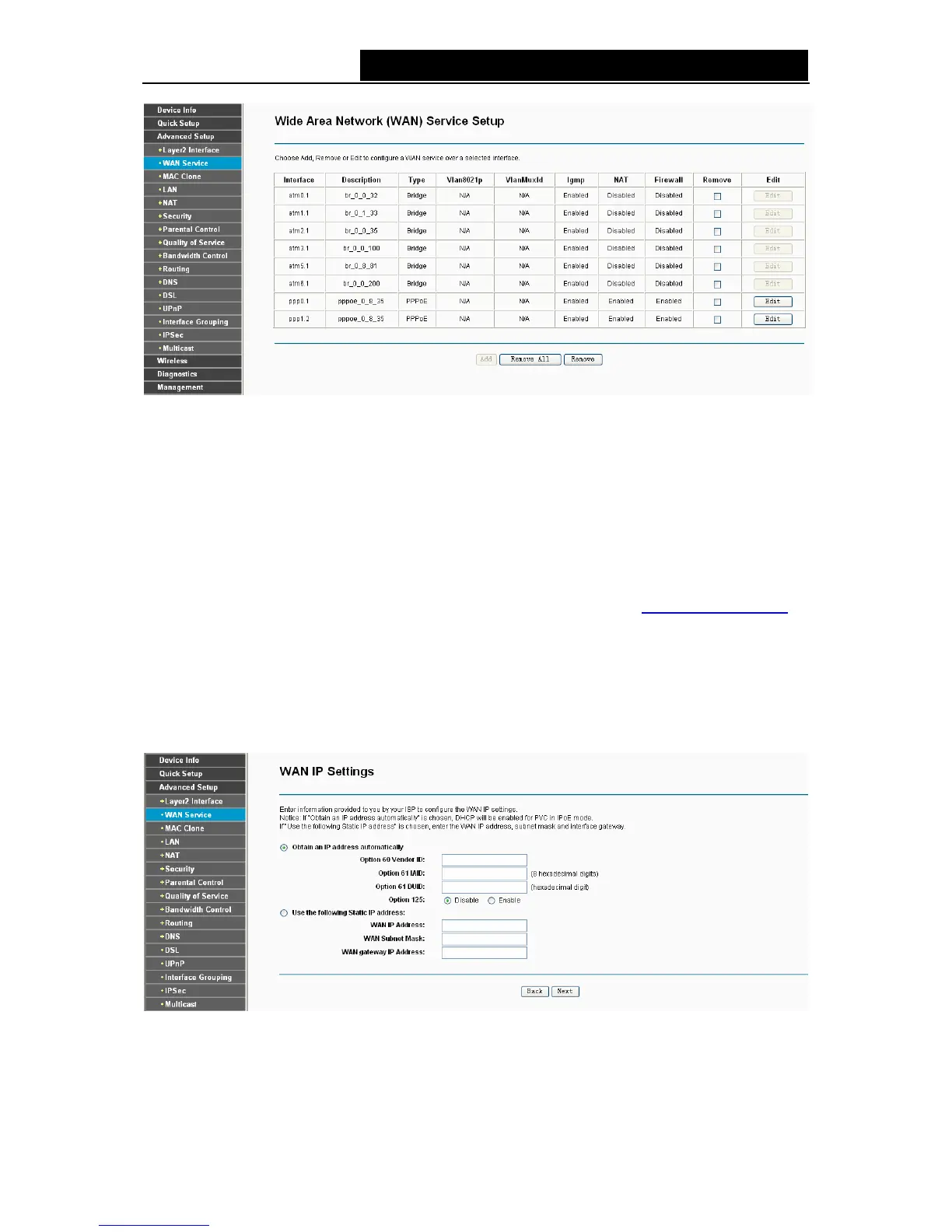
Figure 4-14
¾ Remove All: Click Remove All, then all the interface will be deleted in the table.
¾ Remove: Select the check box in the table above and then click Remove, the corresponding
interface will be deleted in the table.
4.4.2.2 ATM-EoA-IPoE
If your ISP provides an IPoE connection and you need to use an ATM Interface, follow the steps
below to add a WAN service over a selected ATM interface:
1. Add a new ATM interface and select EoA option for DSL Link Type (4.4.1.1
ATM interface).
2. Click the Add button on the screen (as shown Figure 4-7). Select WAN Service Interface over
ATM PVC on the next screen (as shown Figure 4-8).
3. If your ISP provides an IPoE connection, select IP over Ethernet option for the WAN service
type on the screen (as shown Figure 4-9), and click Next button to continue.
4. Enter parameters in the following blanks to configure the WAN IP Address and click Next.
Figure 4-15
¾ Obtain an IP address automatically: Select this option, the modem router will be able to
obtain IP network information dynamically from a DHCP server provided by your ISP.
26



 To Next Page