TL-ST2008 supports rack installation.
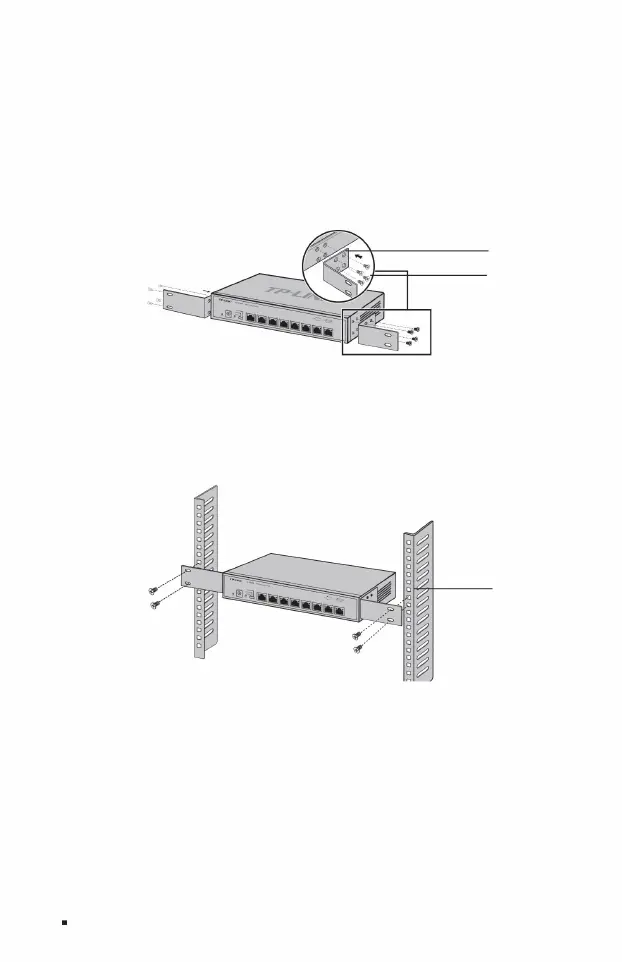
Figure 2-2 Schematic diagram of angle iron installation
4. Use screws to fix the L-shaped angle iron to the guide grooves fixed at both ends of the rack to ensure that the switch is stable.
Fix with the screws provided in Figure 2-2;
1. Check the grounding and stability of the rack; 2.
Install the two L-shaped angle irons in the accessories on both sides of the switch panel, and use the accessories to
3. Place the switch in an appropriate position in the rack and support it on the bracket;
Install it fixedly and horizontally on the rack, as shown in Figure 2-3.
Figure 2-3 Rack installation diagram
ÿ 19-inch standard rack installation
Full 10G Cloud Managed Switch Installation Manual
frame
L-type angle
iron screw
08
Machine Translated by Google



 To Next Page