25
Firewall
Firewall contains several features that are used to deny or allow traffic from passing through the device.
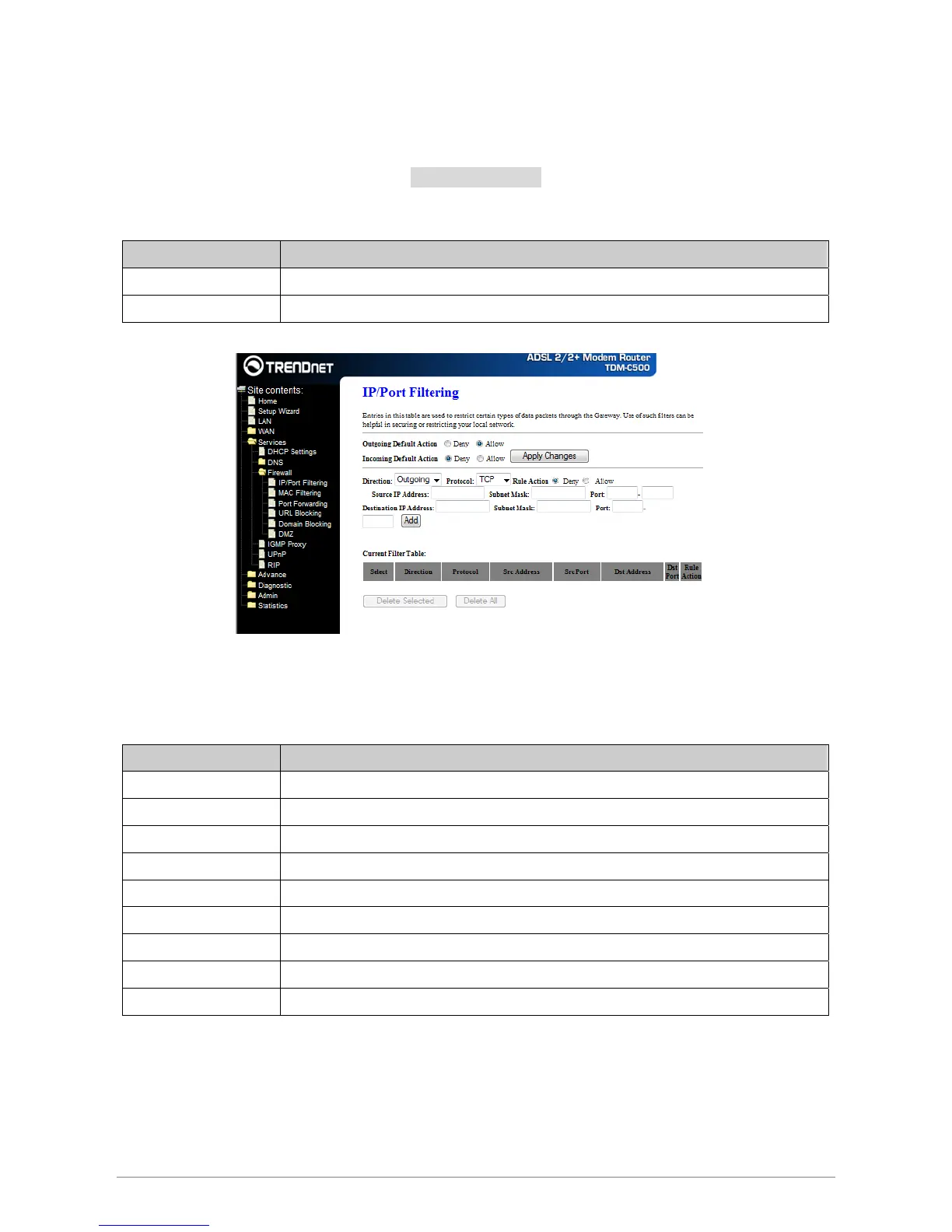
IP/Port Filtering
The IP/Port filtering feature allows you to deny/allow specific services or applications in the forwarding
path.
Field Description
Outgoing Default Action Specify the default action on the LAN to WAN forwarding path.
Incoming Default Action Specify the default action on the WAN to LAN forwarding path.
Apply Changes
Click to save the setting of default actions to the configuration.
Fields on the second setting block:
Field Description
Rule Action Deny or allow traffic when matching this rule.
Direction Traffic forwarding direction.
Protocol There are 3 options available: TCP, UDP and ICMP.
Source IP Address The source IP address assigned to the traffic on which filtering is applied.
Subnet Mask Subnet-mask of the source IP.
Port Starting and ending source port numbers.
Destination IP Address The destination IP address assigned to the traffic on which filtering is applied.
Subnet Mask Subnet-mask of the destination IP.
Port Starting and ending destination port numbers.
Add
Click to add the rule entry to the configuration.
Function buttons for the Current Filter Table:
Delete Selected
Delete selected filtering rules from the filter table. You can click the checkbox at the Select column to select
the filtering rule.














 To Next Page