© Copyright 2019 TRENDnet. All Rights Reserved.
Industrial Managed Switch Series
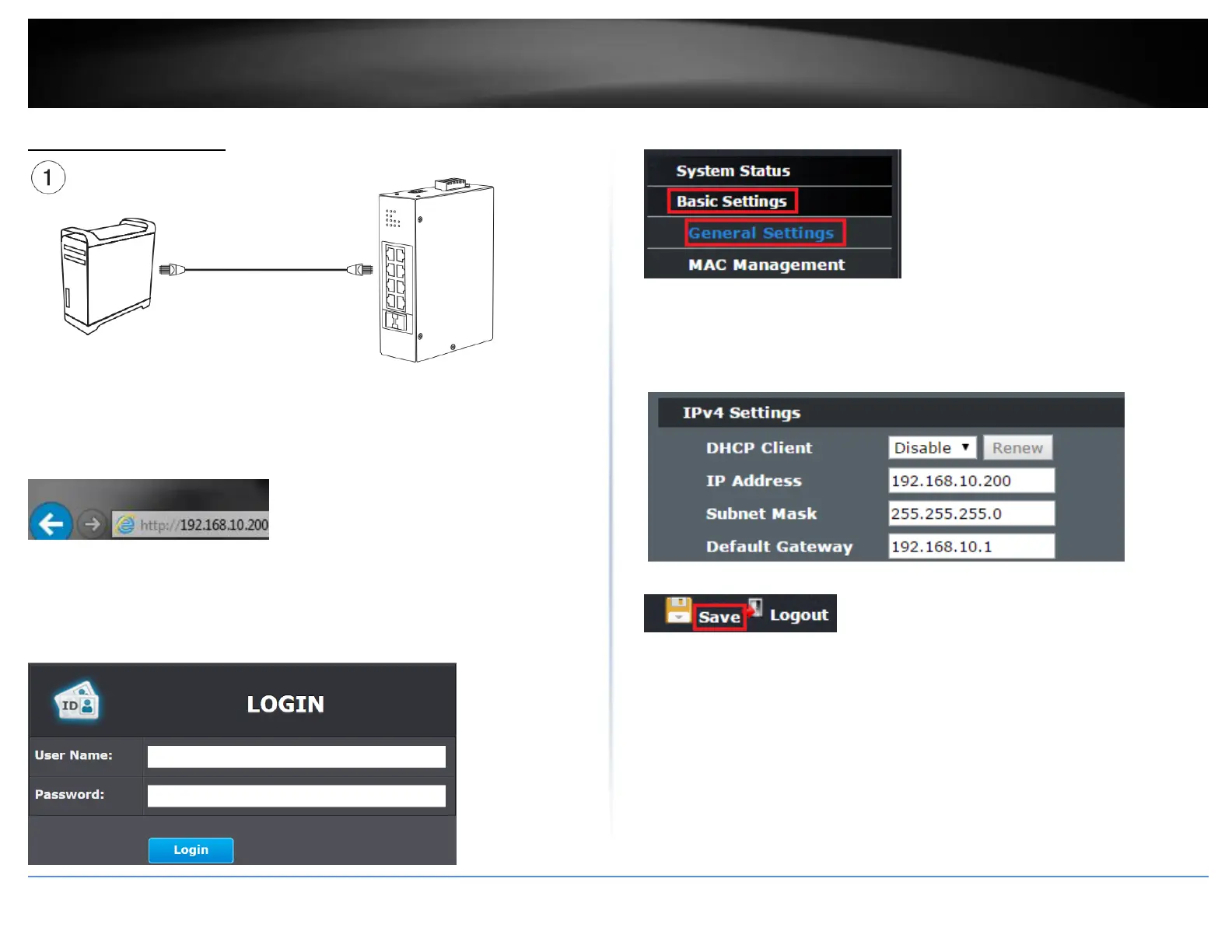
Basic IP Configuration
2. Assign a static IP address to your computer’s network adapter in the subnet of
192.168.10.x (e.g. 192.168.10.25) and a subnet mask of 255.255.255.0.
3. Open your web browser, and type the IP address of the switch in the address bar, and
then press Enter. The default IP address is 192.168.10.200.
4. Enter the User Name and Password, and then click Login. By default:
User Name: admin
Password: admin
Note: User name and password are case sensitive.
5. Click Basic Settings and then click General Settings.
6. Configure the switch IP address settings to be within your network subnet, then click
Apply.
Note: You may need to modify the static IP address settings of your computer’s network
adapter to IP address settings within your subnet in order to regain access to the switch
.
7. Click Save at the top right.
8. When confirmation message appears click OK.
Note: Once the settings are saved, you can connect the switch to your network.



 To Next Page