© Copyright 2019 TRENDnet. All Rights Reserved.
Industrial Managed Switch Series
Link Aggregation
Static Trunk
Link Aggregation (Trunking) is the grouping of physical ports into one logical higher-
capacity link. You may want to trunk ports if for example, it is cheaper to use multiple
lower-speed links than to under-utilize a high-speed, but more costly, single-port link.
However, the more ports you aggregate then the fewer available ports you have. A
trunk group is one logical link containing multiple ports. The Switch supports both static
and dynamic link aggregation.
Note: In a properly planned network, it is recommended to implement static link
aggregation only. This ensures increased network stability and control over the trunk
groups on your Switch.
Default Settings:
The default group Link Aggregation state is disabled for all groups.
The default group Link Aggregation load balance is source MAC and destination
MAC for all groups.
Maximum link aggregation group: 6
Maximum port in link aggregation group: 8
CLI Configuration
The command displays the current trunk
configurations.
link-aggregation
[GROUP_ID] (disable |
enable)
The command disables / enables the trunk on
the specific trunk group.
link-aggregation
[GROUP_ID] interface
PORTLISTS
The command adds ports to a specific trunk
group.
no link-aggregation
[GROUP_ID] interface
PORTLISTS
The commands delete ports from a specific
trunk group.
Example:
[DEVICE_NAME]#configure terminal
[DEVICE_NAME](config)#link-aggregation 1 enable
[DEVICE_NAME](config)#link-aggregation 1 ports 1-4
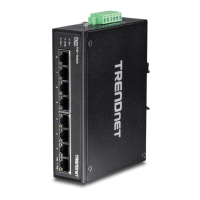
Web Configuration
Advanced Settings > Link Aggregation > Static Trunk



 To Next Page