© Copyright 2019 TRENDnet. All Rights Reserved.
Industrial Managed Switch Series
CLI Configuration
This command displays the PoE
configurations and status.
show poe schedule port PORT_ID
This command displays the PoE
port schedule configurations.
This command disables or enables
the global PoE for the Switch.
This command configures the total
power which the Switch can
support.
This command enables or disables
the PoE function on the specific
port.
poe priority (critical|high|low)
This command configures the
priority of the PoE function for the
specific port.
critical: The highest priority.
high: The middle priority.
low: The lowest priority.
Web Configuration
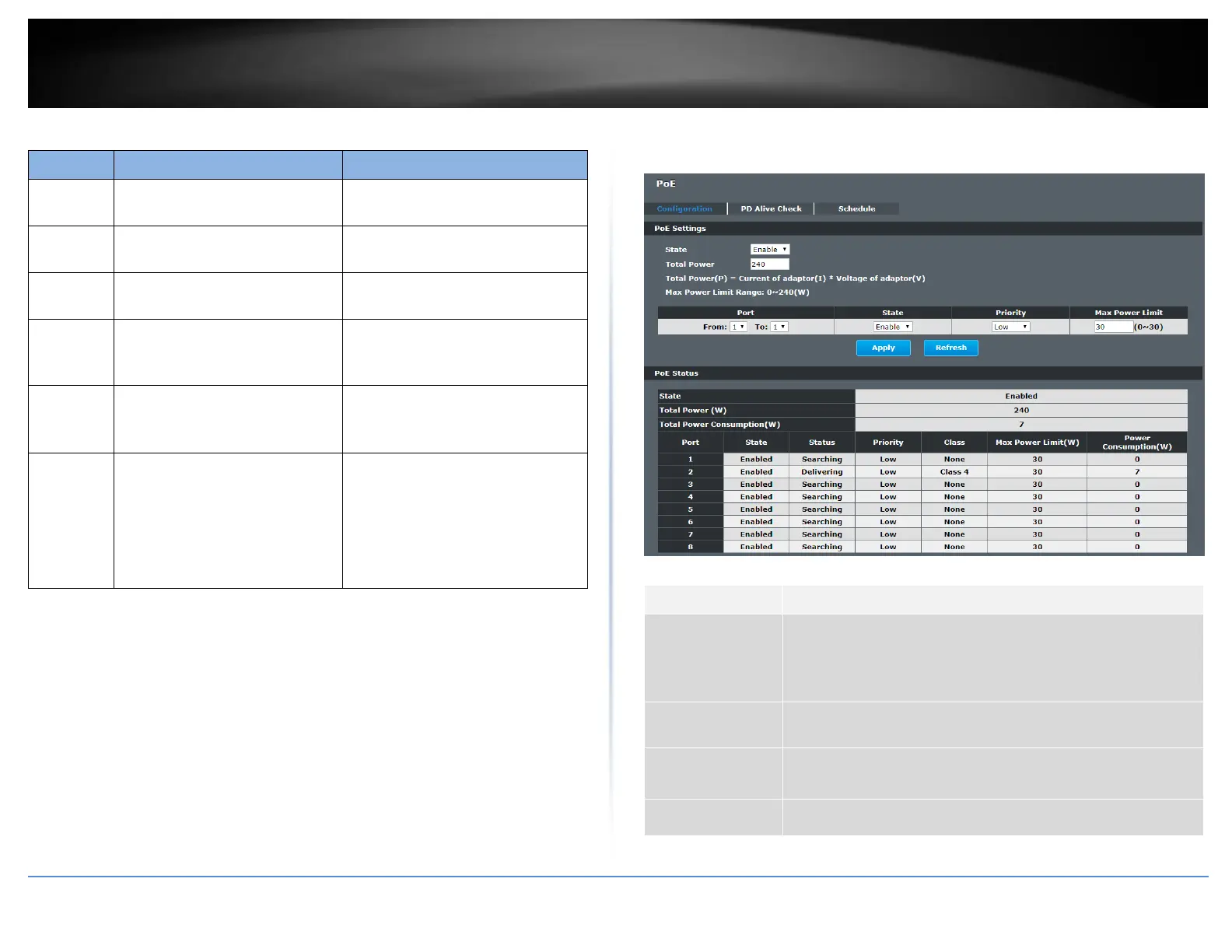
Advanced Settings > PoE > Configuration
Selects the PoE mode, classification or consumption.
Classification - Allocated power according to class (0 to 4).
Consumption - Allocated power according to the actual need of
each PD.
Selects a port or a range of ports that you want to configure
the PoE function.
Selects Enable to enable the PoE function on the specific port.
Selects Disable to disable the PoE function on the specific port.
Selects Critical / High / Low priority for the specific port.














 To Next Page