© Copyright 2019 TRENDnet. All Rights Reserved.
Industrial Managed Switch Series
CLI Configuration
This command displays the
configuration of the PD Alive Check.
pd-alive (disable|enable)
This command disables or enables
the global PD Alive Check for the
Switch.
pd-alive action
(reboot|alarm|all|none)
This command configures the
action when the system detects
that the host cannot respond the
keep-a-live probe packet.
This command configures the
interval to send the keep-a-live
probe packets to check if the host is
still alive for the specific port.
This command configures the Host
IP address which connects to the
specific port.
pd-alive retry-time VALUE
This command configures the retry
times when no response from the
host for the keep-a-live probe
packet for the specific port.
pd-alive power-off-time VALUE
startup-time VALUE
This command configures the
power-off time and startup time.
Web Configuration
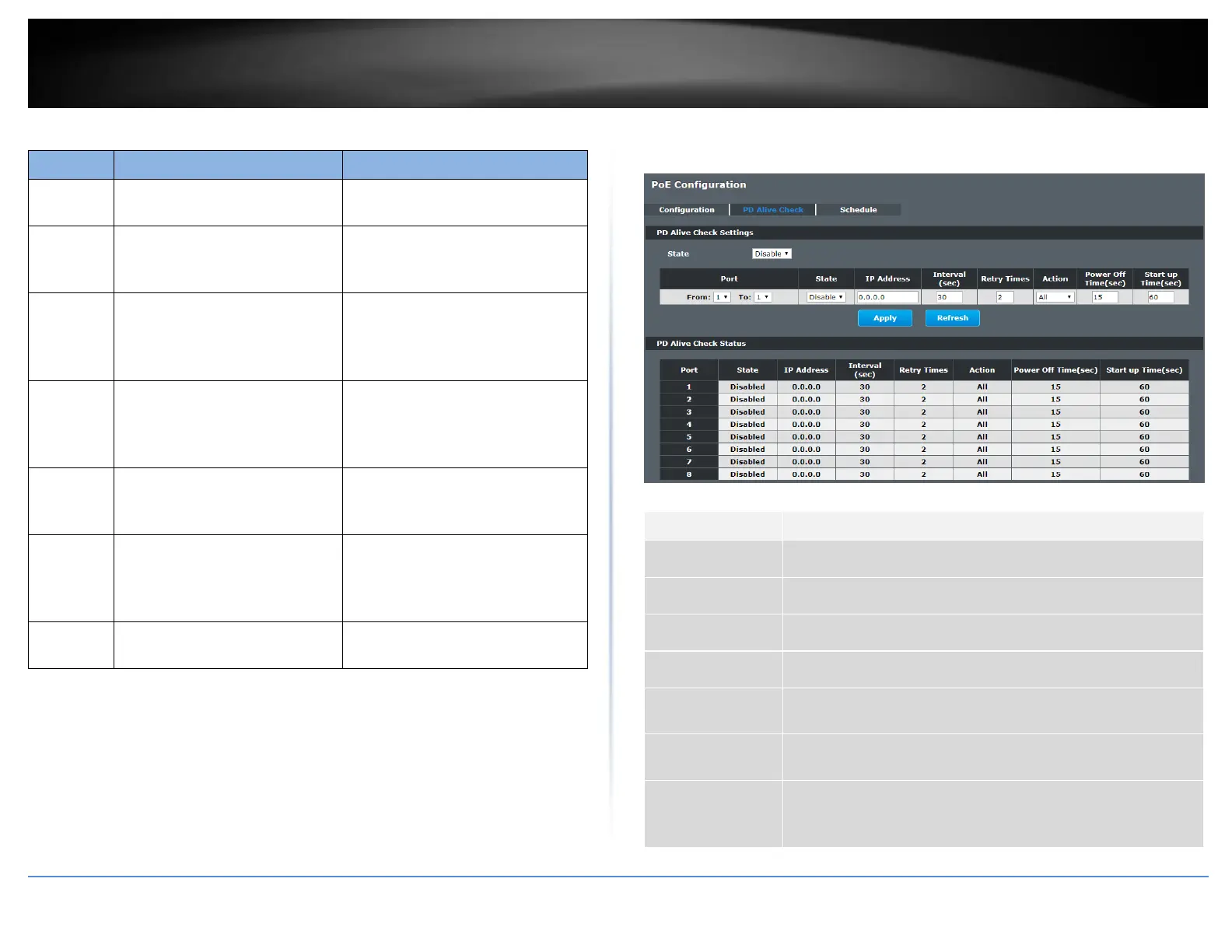
Advanced Settings > PoE > PD Alive Check
Enables/Disables the PD Alive Check.
Selects a port or a range of ports which you want to configure.
Enables/Disables the PD Alive Check for the specific port(s).
Specifies the Host IP address which connects to the port.
The interval to send the packet probes to check if the host is
still alive.
The retry times when no response from the host for the keep-
alive probe packet.
The action to the Power Device when the system detects that
the Power Device cannot respond the keep-a-live probe packet.
The options have Reboot / Alarm / All /None.














 To Next Page