49
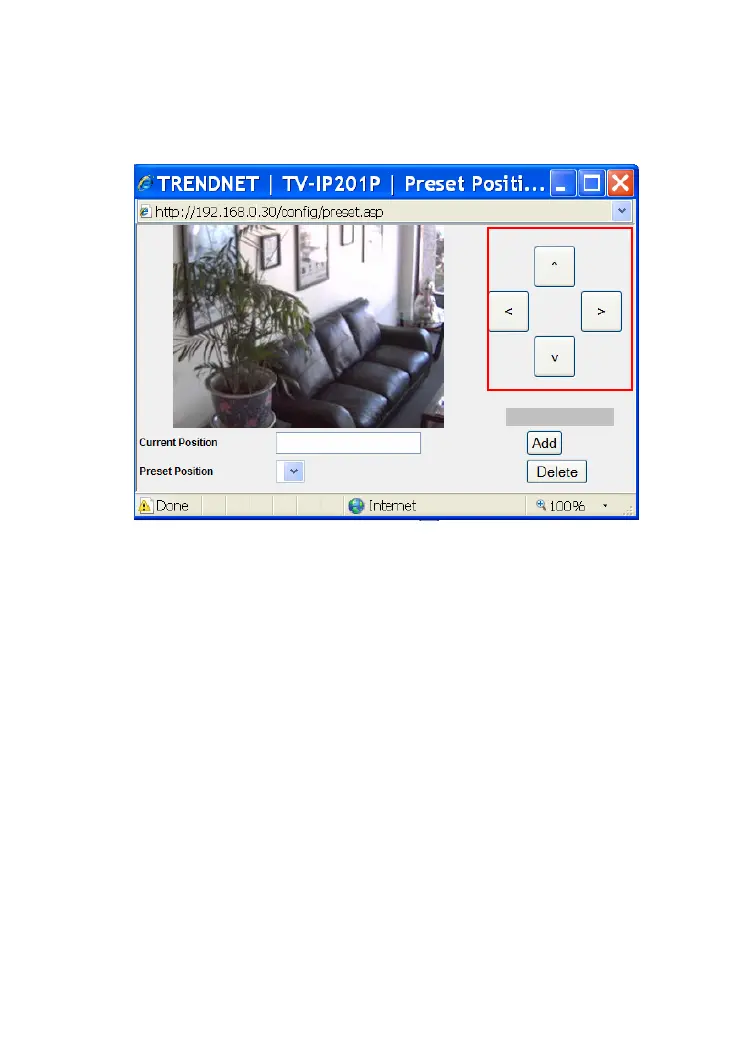
Click the Preset Position button to bring up a control window,
which allows you to control the camera with more options.
• Arrow buttons: Use these buttons to move the camera’s
lens to your desired position. Click the center button to
return to the default home position.
• Current Position: When you move the camera’s lens to
your desired position, assign the position by entering a
name (a maximum of 16 characters) in this box, then
click Add. The position will be saved in the Preset
Position with a number.
• Preset Position: When you have saved position(s) in the
camera, select the position number from the pull-down
list; the camera’s lens will move to the position
immediately. You can use the Add and the Delete buttons
to add/remove the preset position(s). You can save up to
8 positions.
rrow buttons




 To Next Page