62
Item Feature
NO.
Item Description
1 Date/Time
Show current date/time.
2
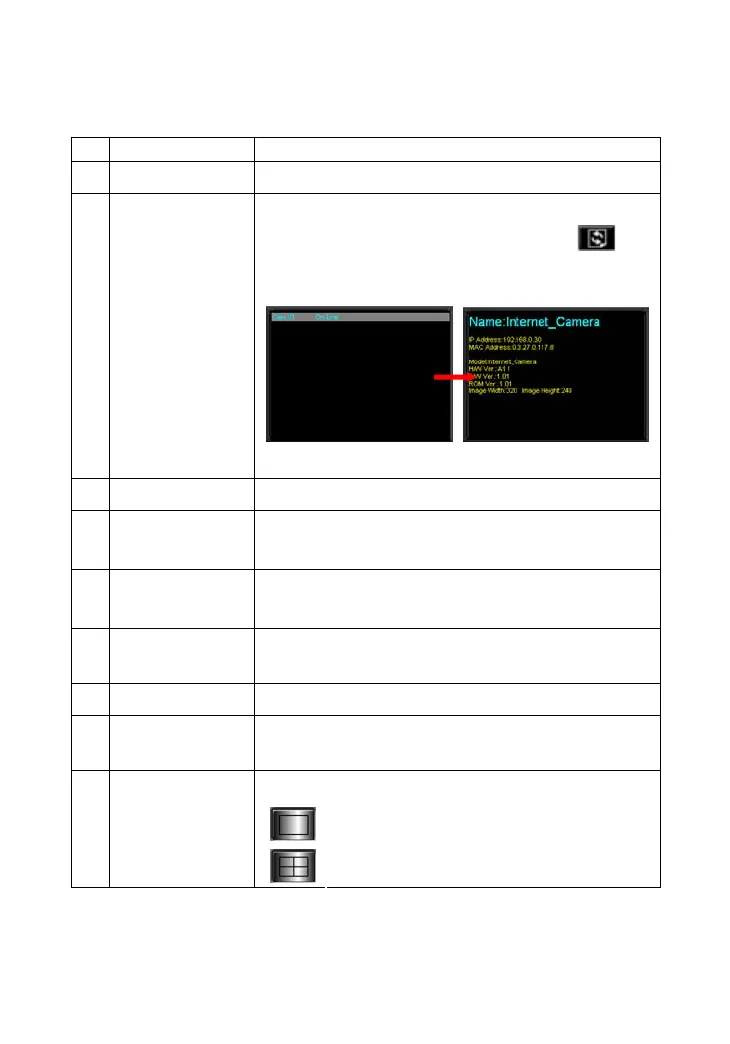
Status Mode
Window
Show the camera’s status in this window.
Click the Change Status Mode button (
) on
the right lower corner of the window to change
the display mode:
Camera list mode Camera information mode
3 View Window
Show the camera’s view in this window.
4 Connect/
Disconnect
Click to connect/disconnect the camera.
5 Rotate image
angle
Click to rotate the image shown in the View
Window.
6 Snapshot
Click to capture a still image from the View
Window.
7 Audio ON/OFF
Click to turn on/off the camera’s audio.
8 Zoom Mode
Click to zoom in/out the image in the View
Window.
Select the view mode from these buttons.
Show one camera in View Window.
9
View Mode
Buttons
Show four cameras in View Window.










 To Next Page