63
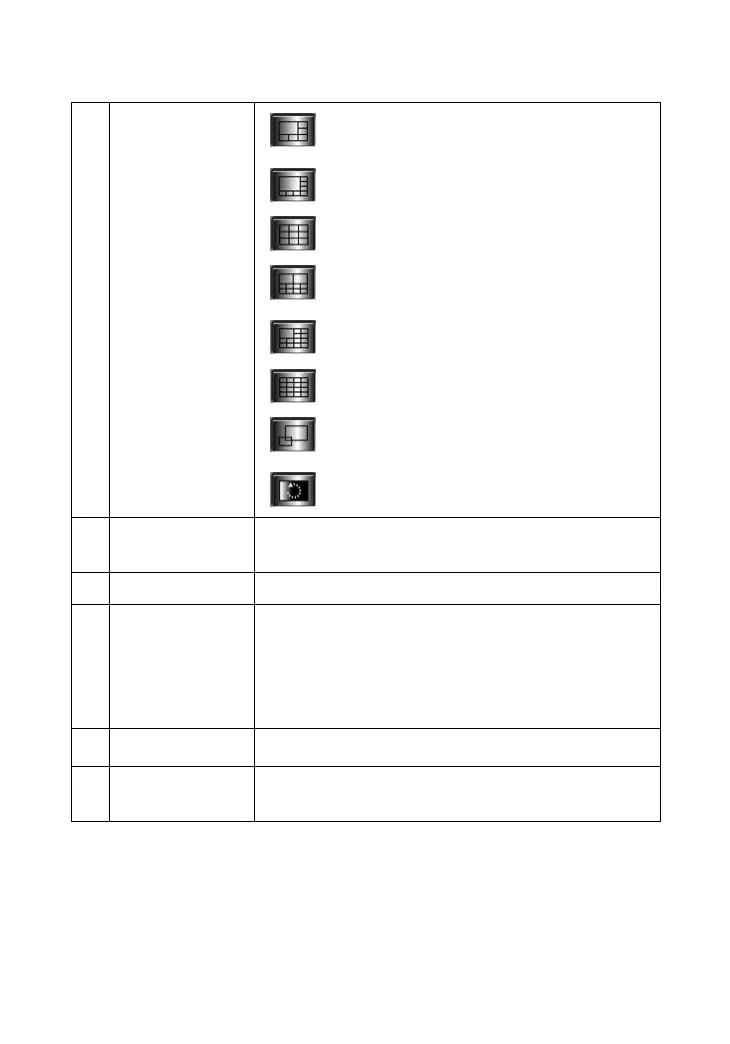
Show six cameras in View Window with
the first one as the major view.
Show eight cameras in View Window
with the first one as the major view.
Show nine cameras in View Window.
Show ten cameras in View Window with
the first two as the major views.
Show thirteen cameras in View Window
with the first one as the major view.
Show sixteen cameras in View Window.
Show the selected camera in full screen
view.
Enable displaying the video views in
circles.
10
Key Lock
Button
Click to lock/unlock the camera. When locked,
the user cannot operate any camera.
11 Power Button
Click to exit or minimize IPView Pro.
12 Record Button
Record video clip of the selected camera and
save it in the computer. The storage position can
be configured in System Configuration. When
you click the button, you can select Manual
Record, Schedule Record, or Motion Record.
13 Play Button
Play the recorded video file in the computer.
14
System
Configuration
Click to enter the System Configuration.










 To Next Page