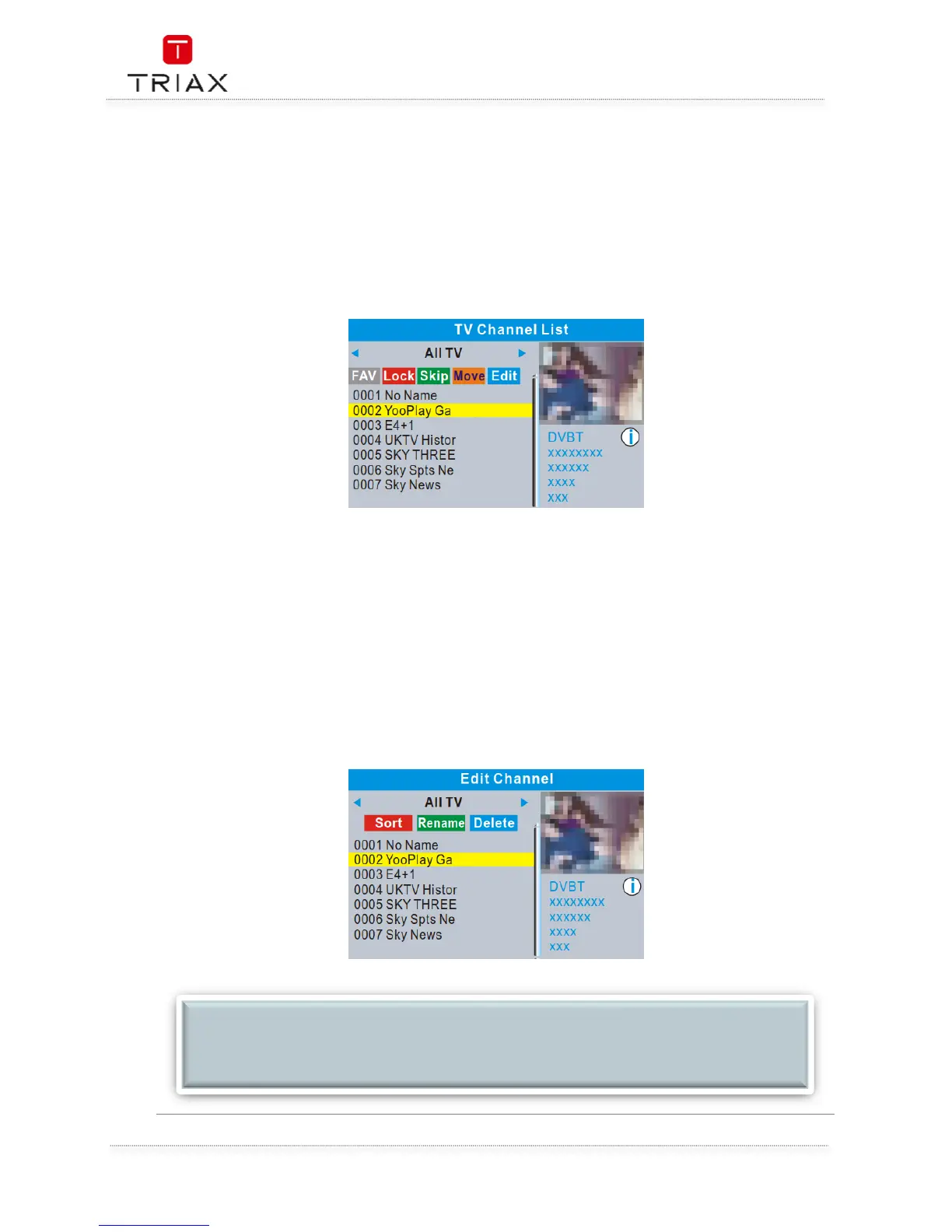
Use this menu to set up Favourite, lock, skip, move, sort d,elete and rename for the selected TV/Radio
channels.
• In the Edit Channel menu, select "TV Channel List" or "Radio channel List", press "OK" button
to enter TV channel list/Radio
• Channel list menu.
Press "UP" or "DOWN" button to highlight the desired channel, press the "OK" button, a
preview of the channel will be displayed in the top right corner of the screen.
o Press "FAV" button, then press "OK" button to set the FAV channels.
o Press "Red" button to activate "Lock" function. you will be asked to input the
password (The dedault password is "0000" ) ,then Press "OK" button to lock the
selected channels.
o Press "Green" button to activate "Skip" function, press "OK" button to skip the
desired channel.
o Press "Yellow" button to activate "Move" function, highlight the desired channel
and press "OK" button to confirm.Press "UP" or "DOWN" button to select the
new position and press "OK" button, the channel will be moved to the new
position.
o Press "Blue"button to enter Edit channel sub menu .
o Press "OK" button again to cancel the corresponding function.
o Press "color" buttons again to exit the corresponding function.
NOTE:
Basically, the operation of "Radio Channel List" is the same as "TV Channel List", but there is
one point different: In "Radio Channel List" mode, there is no video information, so it will
always display Radio's logo in the right side preview window.


 To Next Page