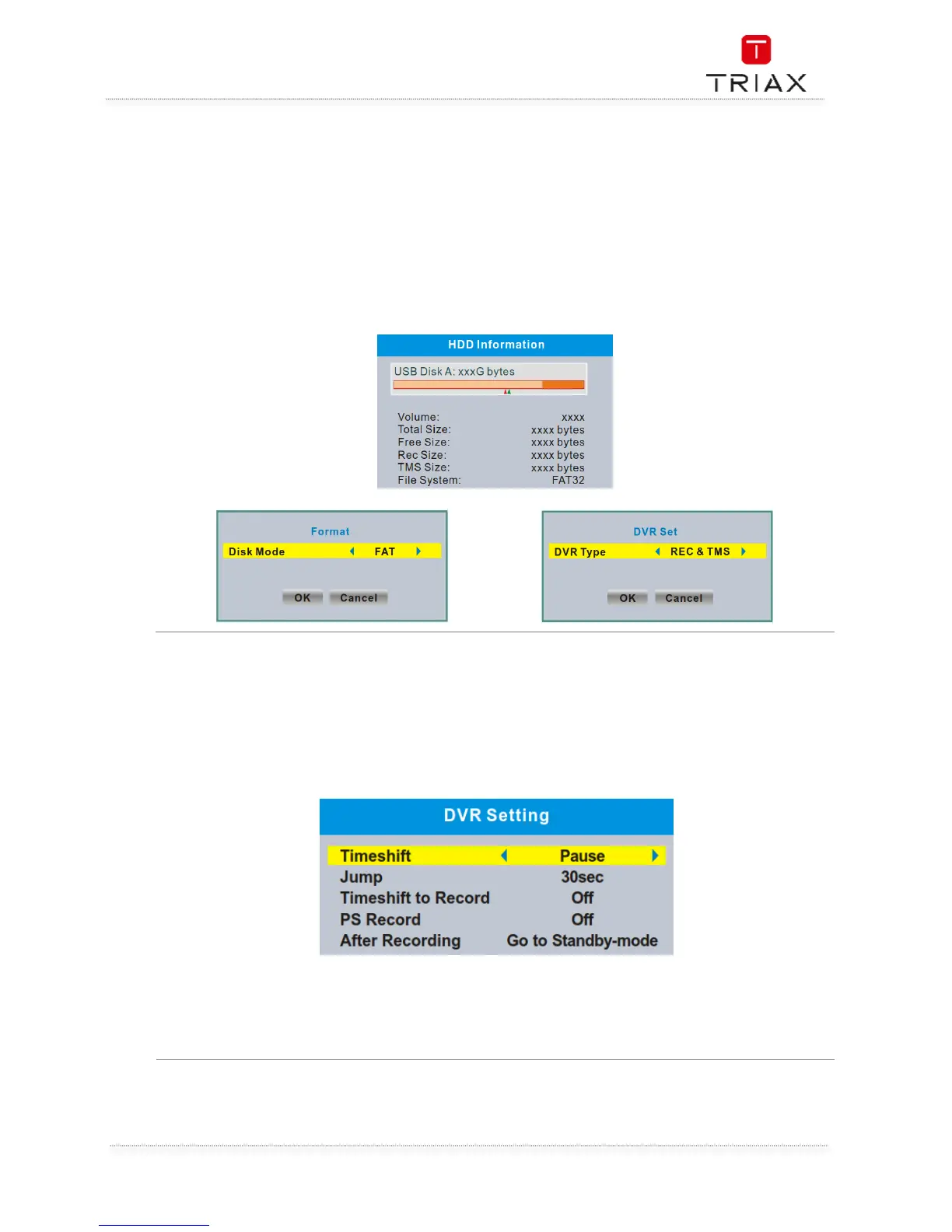
This menu can display some parameters of Removable HDD.
• In "Media Player" menu, select "HDD Information", press "OK" button to open HDD
information window.
• Press "EXIT" button to exit.
•
"YELLOW" button:: Press to set format option (FAT/NTFS).
"BLUE" button:
Press to set DVR Type
(REC & TMS/Record/Timeshift).
This menu allows you to set the DVR Settings.
• In "Media Player" menu, select "DVR Setting", press "OK" button to enter "DVR Setting"menu.
• Press "UP" or "DOWN" cursor button to highlight the desired item and press "OK"button to
enter the sub-menu.
• Press "EXIT" button to exit.
Timeshift: Pause/Off/Auto
Step to: 30sec/1min/5min/10min/15min/20min/30min
Timeshift to Record: On/Off
PS Record: On/Off
After Recording: Watch TV/Go to Standby-mode


 To Next Page