EN
6
1.1 Remote control
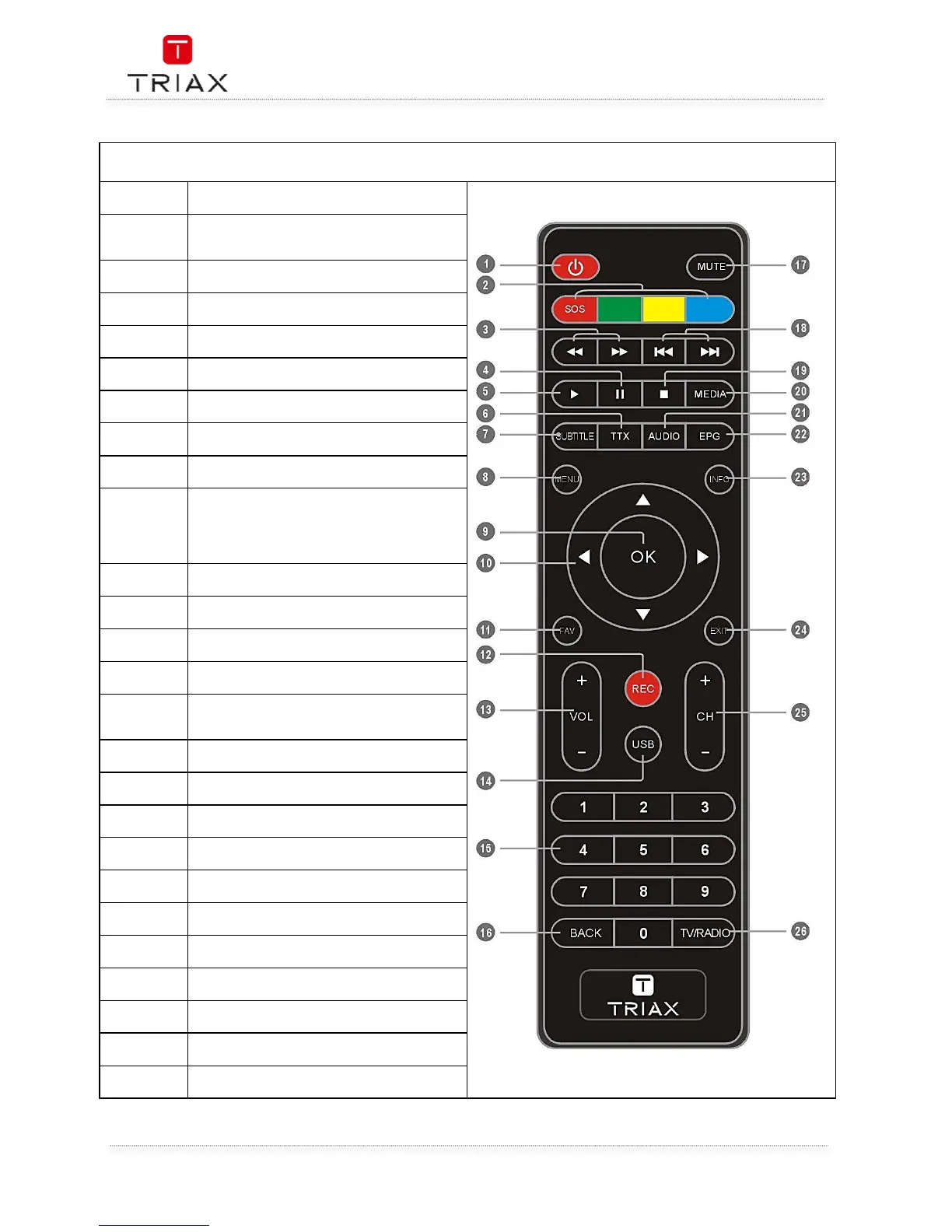
1
STANDBY
(Switch the STB on and standby)
2
RED/GREEN/YELLOW/BLUE Buttons
(For interactive function/Submenu
function buttons)
3
REW( Rewind the playback)
FWD(Fast forward the playback)
4
PAUSE
(Pause/Active timeshift function)
5
TTX (Open interactive service)
7
SUBTITLE (On/Off Subtitle)
8
Menu
(Open and close the menu screen)
9
OK button
(Confirm a selection)
10
(Cursor: Navigation buttons used to
navigatemenus items)
(CH+/-: Channel Up and Down
VOL+/-:Volume Up and Down)
11
FAV
(Open the Favorite list)
12
RECORD
(Record the TV program and the radio)
13
VOL+,-(Volume Up and Down)
14
USB
(Enter Device List)
15
(Enter numeric values and select the channel
directly by entering it's number)
16
BACK
(Switch to previous channel)
17
MUTE (Turn off/on the volume)
18
PREV(Skip Backward)/NEXT(Skip Forward)
19
MEDIA
(Enter Movie playback)
21
AUDIO
(Select audio mode and audio track)
22
EPG
(Open up Electronic Program Guide Menu)
23
INFO
(Press for current channel information )
24
CH+,-
(Channel Up and Down)
26
TV/RADIO
(Switch between TV and Radio)


 To Next Page