EN
24
10. Timeshift / Record
Mass storage device on the USB port
Plugging an external Mass Storage Device on the USB port gives you access to Time Shift/Record
a broadcast programme.
• Pause a broadcast programme and continue watching it later (Time Shift )
• Record a broadcast programme.
• When the space available on the Mass Storage Device runs out, recording operation of
broadcast will stop.
Initiate:
Initiate:Initiate:
Initiate:
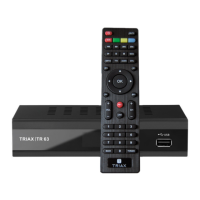
Time Shift can be done in full screen mode by pressing the "PAUSE" button.
• Press "RIGHT" or "LEFT" button to select the time you want to start.
• Press "OK" button to start timeshift playback.
Playback
PlaybackPlayback
Playback
During the playback, it is possible to perform the following actions :
• Press "PAUSE" button to pause the playback.
• Press "FORWARD" button to fast forward the playback.
• Press "BACKWARD" button to rewind the playback.
• Press "STOP" button to stop TimeShift playback and return to Live programme.
Instant
InstantInstant
Instant
record
recordrecord
record
In full screen mode, press "RECORD" button to record the current programme instantaneously.
• Press "RECORD" button again can input duration.
• Press "STOP" button to stop recording, then a confirmation window appears.
• Select "Yes" to stop recording. Select "No" to continue recording.
Timer record
Timer recordTimer record
Timer record
During the playback, it is possible to perform the following actions :
•
You can enter timer setting menu to set a timer record by EPG or System set up option.
NOTE:
Please use USB 2.0 disk when recording or timeshift.
For timeshift and recording feature, you need a bigger size USB drive or HDD (>2GB).


 To Next Page