5
Throttle
From the app home screen, touch the SETTINGS tab.
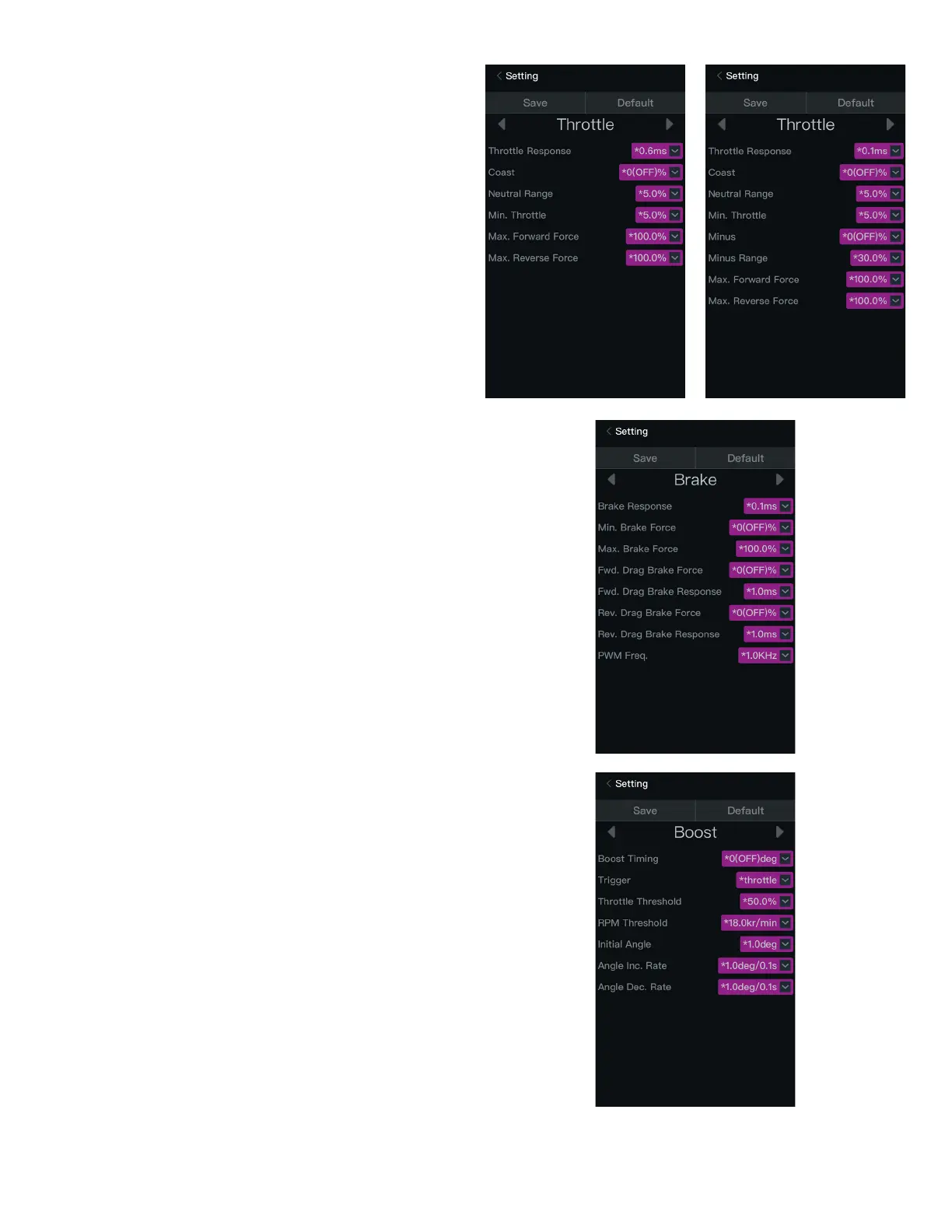
The Throttle settings screen appears. Touch any of the value boxes to change the
parameter value.
The following throttle parameters display:
• Throttle Response: The shorter the time, the quicker the acceleration.
• Coast: With this function activated, the car coasts briefly when reducing the
throttle input.
• Neutral Range: The wider the neutral range, the further the throttle must be
moved from neutral.
• Minimum Throttle: The greater the value, the more aggressive the start-up
when moving the throttle from neutral.
• Minus: The greater the value, the lower the car speed.
• Minus Range: Determines the throttle range within which the Minus function
works. The greater the value, the wider the effective range.
• Maximum Forward Force: The lower the value, the slower the maximum
speed in forward.
• Maximum Reverse Force: The lower the value, the slower the maximum
speed in reverse.
Brake
From the Throttle screen, touch the right scroll arrow.
The Brake settings screen appears. Touch any of the value boxes to change the
parameter value.
The following brake parameters display:
• Brake Response: The shorter the time, the faster the response to brake input.
• Minimum Brake Force: The higher the value, the stronger the brake force
when moving the throttle from neutral.
• Maximium Brake Force: The lower the value, the weaker the maximum
brake force.
• Forward Drag Brake Force: The brake force when the throttle is at neutral.
The lower the value, the further the vehicle coasts.
• Forward Drag Brake Response: The shorter the time, the faster the braking
response in forward.
• Reverse Drag Brake Force: The brake force when the throttle is at neutral.
The lower the value, the further the vehicle coasts.
• Reverse Drag Brake Response: The shorter the time, the faster the braking
response in reverse.
• PWM Frequency: The PWM frequency for braking.
Boost
From the Brake screen, touch the right scroll arrow.
The Boost settings screen appears. Touch any of the value boxes to change the
parameter value.
IMPORTANT: Increasing the boost and/or turbo timing too aggressively will
cause excessive heat in the motor and ESC and may affect the service life of
the motor, ESC, and battery.
If the Low Voltage or Thermal Protection features are active and either value is
exceeded, all timing values are ignored.
The following boost parameters display:
• Boost Timing: When activated, the ESC electronically advances the motor
timing to increase the power output.
• Trigger: How boost timing is triggered, either by throttle position or motor RPM.
• Throttle Threshold: When the Trigger value is set to throttle, the throttle
threshold value determines beyond which value the boost timing is triggered.
• RPM Threshold: When the Trigger value is set to RPM, the RPM threshold
value determines beyond which value the boost timing is triggered.
• Initial Angle: The timing value when the boost timing is initially activated. The
higher the value, the more aggressive the power.
• Angle Increase Rate: The rate at which the boost timing increases over time.
The higher the value, the more aggressive the power.
• Angle Decrease Rate: The rate at which the boost timing decreases over
time. The higher the value, the quicker the speed decreases. The effect,
similar to braking, is generated during high speed.
MX10
MX8



 To Next Page