6
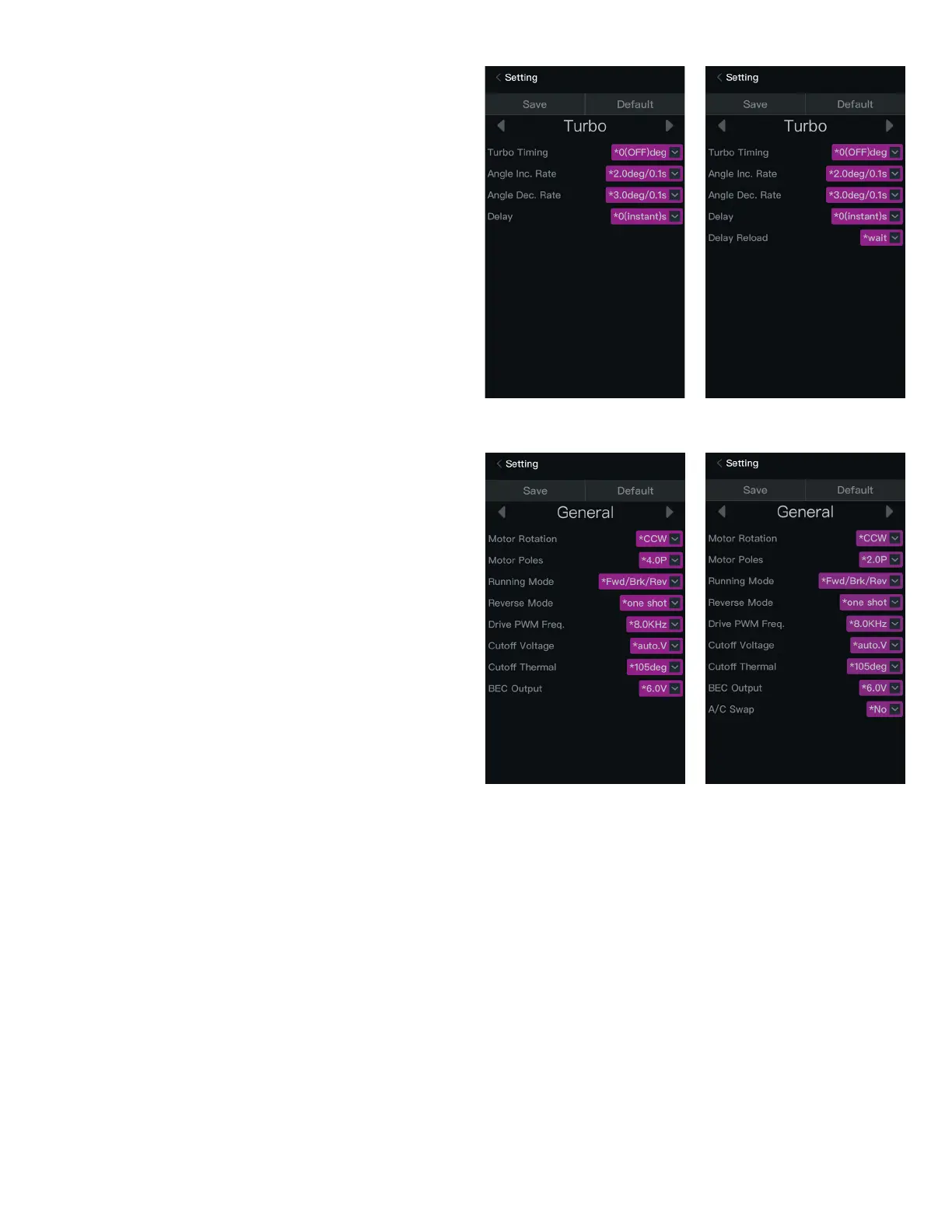
Turbo
From the Boost screen, touch the right scroll arrow.
The Turbo settings screen appears. Touch any of the value boxes to change the
parameter value.
IMPORTANT: Increasing the boost and/or turbo timing too aggressively will
cause excessive heat in the motor and ESC and may affect the service life of
the motor, ESC, and battery.
If the Low Voltage or Thermal Protection features are active and either value is
exceeded, all timing values are ignored.
The following turbo parameters display:
• Turbo Timing: The timing value activates when throttle input reaches 100%.
• Angle Increase Rate: The higher the value, the more aggressive the power.
• Angle Decrease Rate: The higher the value, the faster the speed decreases.
The effect, similar to braking, is generated during high speed.
• Turbo Delay: The amount of time the turbo function is delayed after throttle
input reaches 100%.
• Turbo Delay Reload: It determines whether to delay and reload when the
throttle trigger/stick is moved away and quickly returned to the 100% point
with the Turbo Timing is activated. Two options include: Wait (reload after the
turbo timing is decreased to 0), Instant (reload immediately when the throttle
trigger/stick is moved away from the 100% position).
General Settings
From the Turbo screen, touch the right scroll arrow, or from the Throttle screen,
touch the left scroll arrow.
The General settings screen appears. Touch any of the value boxes to change the
parameter value.
The following general settings parameters display:
• Motor Rotation: Determines the direction that the motor spins. The factory
default setting may run opposite the desired direction in some scenarios. This
function allows users to switch the rotational direction.
• Motor Poles: Manually set the pole count of the motor to get the correct RPM
value from the ESC. Check the motor RPM during operation in the Data screen.
• Running Mode: Choose from three running modes: Forward/Brake, Forward/
Brake/Reverse, and Forward/Reverse.
• Reverse Mode: When the running mode is set to Forward/Brake/Reverse,
choose from two options to activate the brake: One Shot (pull the throttle/
brake once) and Two Shots (quickly pull the throttle/brake twice).
• Drive PWM Frequency: The PWM frequency is used to drive the motor. The
lower the PWM frequency, the faster the acceleration, and the worse the
throttle linearity; the higher the PWM frequency, the smoother the throttle
linearity. This may result in a higher motor temperature.
• Cutoff Voltage: Set value to Auto to automatically identify the number of
LiPo cells connected when the ESC is powered ON and determine a safe
cutoff voltage. Choose a voltage value to manually select a cutoff voltage
appropriate to the vehicle battery.
• Cutoff Thermal: The ESC automatically ceases operation when the internal
temperature rises above the selected value.
• BEC Output: Select the appropriate output of the battery eliminator circuit,
depending upon the servo voltage requirements.
• A/C Swap: Switches the A and C motor wires. When selecting “No,” the ESC
output connects to the motor in the following sequence: A-A, B-B, and C-C;
when selecting “Yes,” the wiring sequence is: A-C, B-B, C-A.
MX10
MX8
MX10
MX8



 To Next Page