CamView IP Pro, Pro-C, and Pro+ User Manual 9
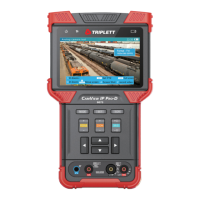
Power Button
• Press and hold for 2 seconds to turn the tester on / off
• Press twice quickly to turn the Flashlight on / off
(Flashlight feature may be used while the tester is on)
Audio Input Jack — 3.5 mm audio connector for plugging in camera audio to test
USB Port — Mini USB Port used to connect computer to the tester to download reports /
videos / screen captures
Reset Button — Use a paperclip to press and hold the Reset Button to reboot the device
if necessary
12V DC Output Jack — 12V / 2A 4mm (internal pin diameter 1.65mm. Used to provide
power to Analog cameras
RS485 Port — Use to test PTZ functions on Analog cameras
Network Port 1 (Blue outline) — 1 Gbps RJ45 Port for ethernet OUT
• Provides POE and network link out to camera
• LINK/ACT Light — Network Port link and data activity indicator (green)
• PSE Light — POE Power Supply Indicator (orange)
Network Port 2 (Green outline) — 1 Gbps RJ45 Port for ethernet IN
• Accepts POE
• Used for charging the tester
• Used as Network Input on an existing network when placing tester in series
with the camera or to run network tests (e.g., ping, sniff, etc.)
• LINK/ACT Light — Network Port link and data activity indicator (green)
• PD Light — POE Power Accept Indicator (orange)
29
30
31
32
33
34
35
36



 To Next Page