22 CamView IP Pro, Pro-C, and Pro+ User Manual
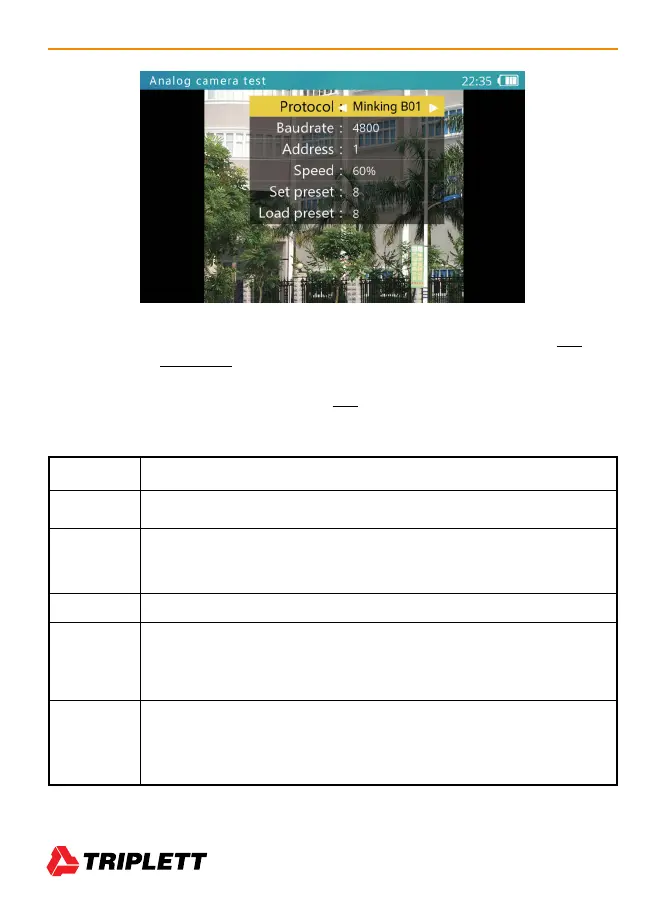
To access and change the Tester’s settings to match the camera’s settings, press SET and
then use the Arrow Keys to navigate the screen. (See image above.) When adjusting the
parameters, press Iris- to restore previous values if you don’t want to save the setting. Once
you have updated all of the settings, press SET again to save your changes. The changes
will be applied immediately.
Protocol Select RS485 PTZ protocol. The tester supports many PTZ protocols.
Baud Rate RS485 communication baud rate.
Address Address of PTZ to control. Due to different camera manufacturer settings, the
address may be offset by +/-1.Address range is dependent on the protocol.
Speed Expected PTZ speed, 10%-100%.
Set Preset Adjust this value, and then press Iris+ to save the camera’s current position
to its internal storage. This function is provided by the camera. Refer to the
camera’s manual for details.
Go Preset Adjust this value, and then press Iris+. The camera will go to the corresponding
pre-saved position at maximum speed. This function is provided by the camera.
Refer to the camera’s manual for details.



 To Next Page