24 CamView IP Pro, Pro-C, and Pro+ User Manual
4.3.5 Testing Remote Analog Monitors and Optical Transmitters/Receivers
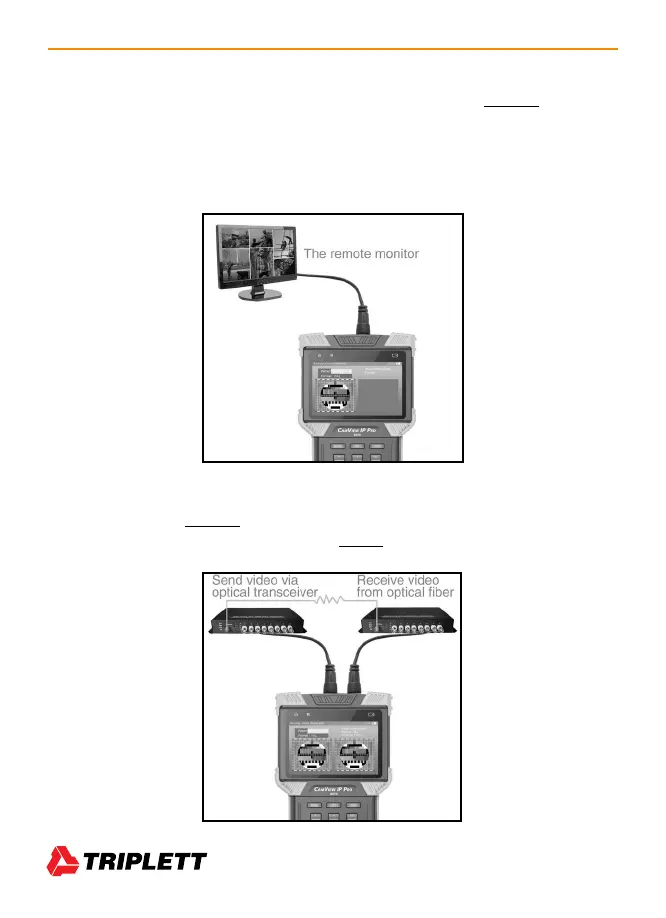
You can transmit generated video to the remote monitor or DVR using the BNC Out jack (see im-
age below). This will allow you to test the cable and monitor by comparing the image quality on the
Tester to the image quality on the monitor. You can do this with either a live feed from the camera
when you are in the Analog Camera Test screen, or when you are viewing a test pattern in the
Analog Video Generator screen.
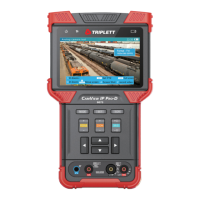
You can also test the Optical Transmitters/Receivers in the circuit by connecting an optical
video transmitter to the BNC Out on the Tester, then connecting that transmitter to an optical video
receiver, and finally connecting the receiver to the BNC In on the Tester. (See image below.)



 To Next Page