26 CamView IP Pro, Pro-C, and Pro+ User Manual
47
48
49
50 51 52 53
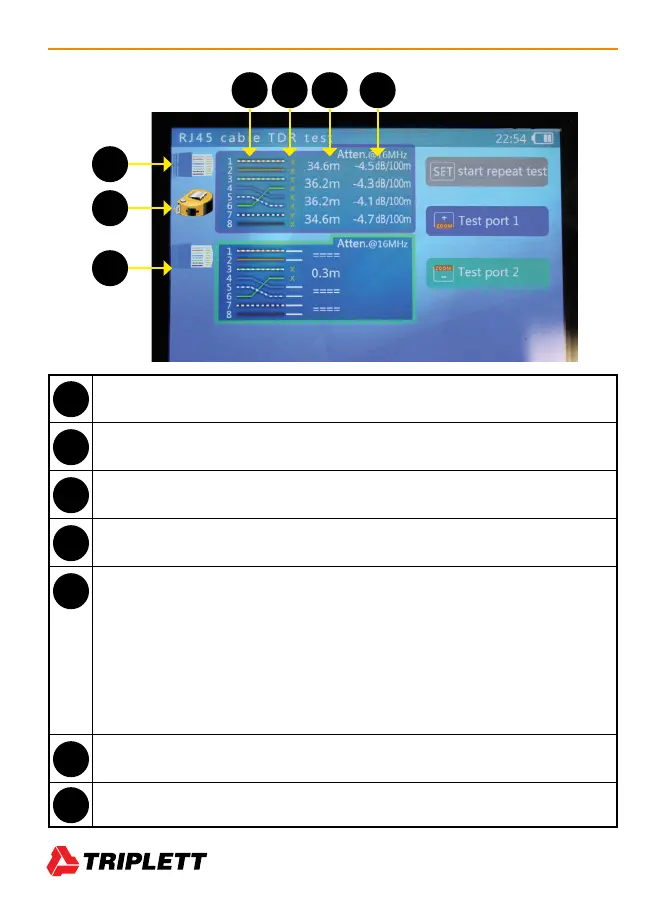
Network Port 1 Icon
Tape Measure — Flashes just under the Network Port icon when a cable is being tested.
Network Port 2 icon
Cable Pairs — Both by number and color pattern.
Cable Pair Status — Test results for each pair are displayed here.
• A solid horizontal line indicates pass-through (good cable; no breaks)
• An X indicates the cable is not passing through. In a Length-Only test, this will
always show X because the other end of the cable is not connected to the Tester.
• A > symbol indicates a short of at least one wire in the pair.
• “Test Failed” will display if the wire is in poor condition or for other unknown
reasons.
Approximate Length of Cable — Length of cable (in meters) to termination or open.
Other Test Results — Attenuation, Skew, etc., will appear here.
47
48
49
50
51
52
53



 To Next Page