30 CamView IP Pro, Pro-C, and Pro+ User Manual
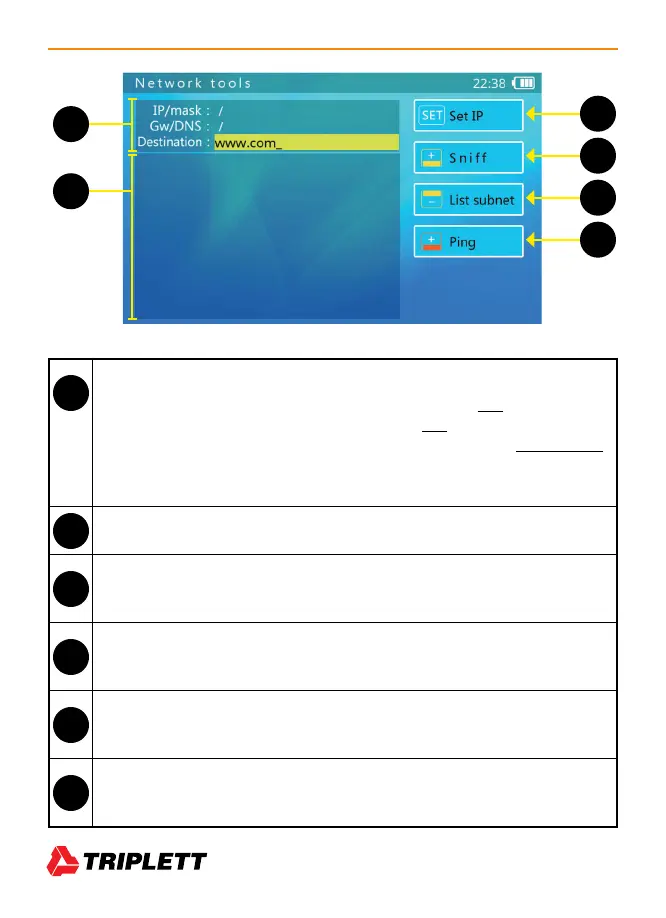
Tester’s Current Network Settings
• IP/Mask - Tester’s IP Address and Subnet Mask. Select SET to change.
• GW/DNS - Tester’s Gateway and DNS. Select SET to change.
• Destination - Ping destination. When the bar is yellow, use the Flip Keyboard
to change the information in this field. Both IP addresses and Domain Names
are supported.
Information Display area — Results of testing will be listed here.
Set IP — Used to access the IP Settings screen to change the Tester’s settings between
Static IP and DHCP
Sniff — Select Focus+ to run the Sniff test. This option will dim when other tests are
running
List Subnet — Select Focus- to run the List Subnet test. This option will dim when other
tests are running.
Ping — Select Zoom+ to run the Ping test. Press Zoom+ again to end the test. This
option will dim when other tests are running.
53
54
55
56
57
58
53
55
56
57
58
54



 To Next Page