17
5. Load Ramping and Shedding
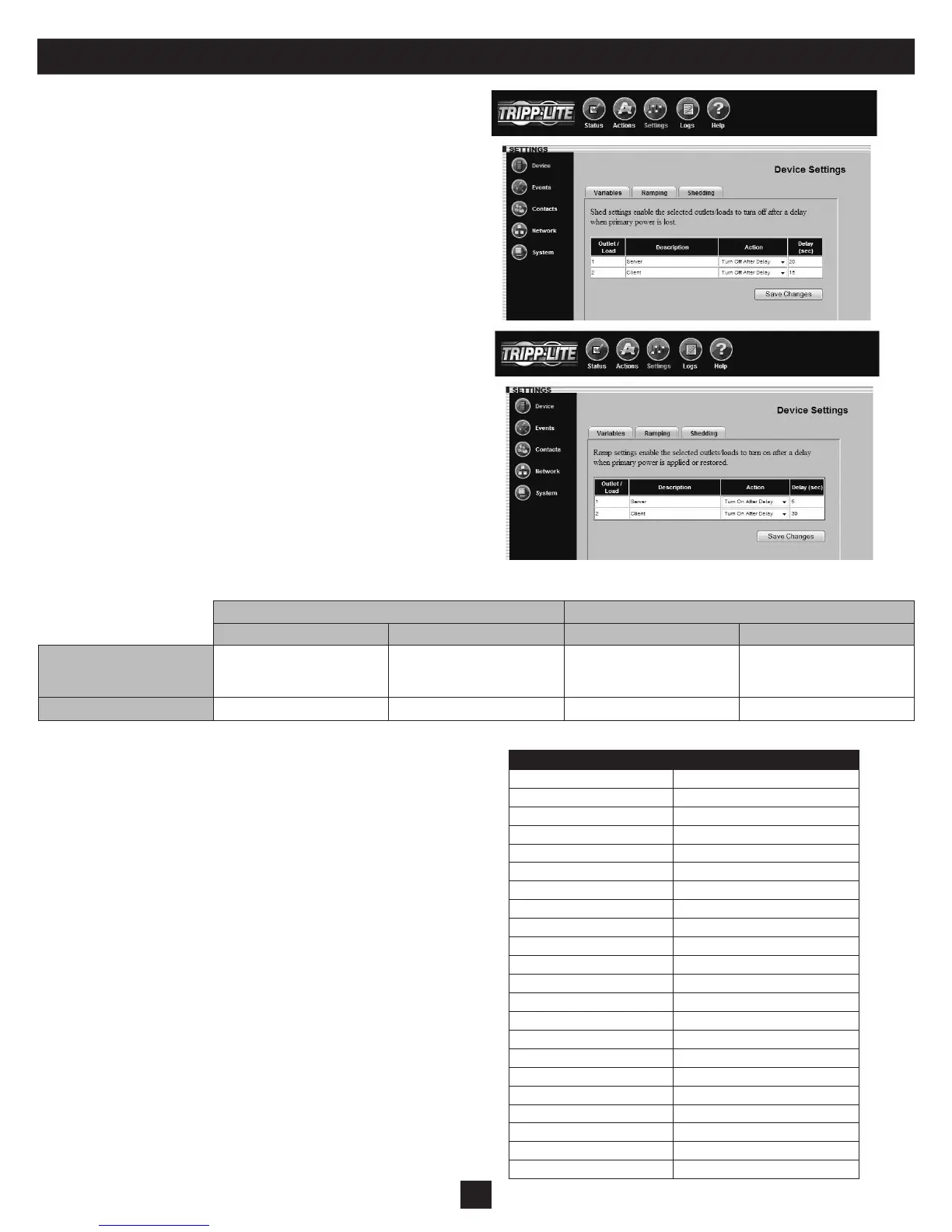
Click the “Settings” menu button and the “Device” submenu button
to display the Settings > Device page. If your device supports load
ramping and shedding, the “Ramping” tab and/or “Shedding” tab
(Figure 5-1) will be available.
The “Ramping” and “Shedding” tabs each contain a table of the
load segments available for your device. Each load segment has
a “Description” eld, an “Action” eld and a “Delay” eld. The
“Description” eld allows you to enter a note about the equipment
connected to the load segment. The “Action” eld allows you to
congure the load ramping or shedding behavior by choosing from
the possible actions listed in the drop-down menu. The “Delay” eld
allows you to enter the delay (in seconds) before the specied action is
performed. After entering the desired values, click the “Save Changes”
button to make the values active. Ramping sequences are applied when
AC input power is switched on. Shedding sequences are applied when
AC input power is lost, increasing the battery backup runtime available
for supported equipment. You can disable load shedding by setting all
actions to “Remain On.” You can disable load ramping by setting all
actions to “Remain Off.”
Load ramping and load shedding require a Tripp Lite UPS system or
PDU with switchable load banks (banks of one or more outlets that
can be switched on and off remotely, independent of other outlets).
A device that has switchable load banks can be classied as an
autonomous device or a non-autonomous device, which determines its
load ramping and load shedding characteristics (Figure 5-2).
An autonomous device can execute stored load shedding and load
ramping congurations independent of an SNMPWEBCARD
or PowerAlert. Conguration of an autonomous UPS system
requires PowerAlert or an SNMPWEBCARD (disconnect the
SNMPWEBCARD network cable before attempting to use an
autonomous UPS system’s RS-232 serial port). Conguration of an
autonomous PDU requires an SNMPWEBCARD (the card is pre-
installed in “NET” models). Figure 5-3 lists autonomous devices that
are currently available.
Non-autonomous devices require an SNMPWEBCARD for
conguration and execution of a custom load shedding sequence. Non-
autonomous devices do not support custom load ramping. UPS systems
that have switchable load banks are non-autonomous devices unless
they are listed in Figure 5-3.
Note: Load ramping and shedding can also be congured through
the telnet console. (Select the rst menu option “1- Devices” from the
Main Menu, then select the rst device from the Device List menu, then
select the third menu option “3- Settings”. From the Settings menu,
select the second menu option “1- Device”. From the Device Settings
menu, select the second menu option “2- Shedding” for shedding
conguration or the third menu option “3- Ramping” for ramping
conguration.)
Figure 5-1: Settings > Device > Shedding & Ramping Tabs
Custom Load Ramping Custom Load Shedding
Configuration Execution Configuration Execution
Autonomous Device
Requires SNMPWEBCARD
or PowerAlert.
Functions without
SNMPWEBCARD or
PowerAlert.
Requires SNMPWEBCARD
or PowerAlert.
Functions without
SNMPWEBCARD or
PowerAlert.
Non-Autonomous Device
Not supported. Not supported. Requires SNMPWEBCARD. Requires SNMPWEBCARD.
Figure 5-2: Autonomous and Non-Autonomous Device Characteristics
Part Number Series Number
SMART1500CRMXL All
SM2200RMDVTAA All
SM2200RMXL2UP All
SM2200RMXL2UTAA All
SMART2200CRMXL All
SMART2200RM2U AGSM7501
SMART2200RMXL2U AGSM6803, AGSM7109
SMART2600RM2U AGSM6907
SM3000RMNAFTA AGSM7090
SM3000RMXL2UTAA All
SMART3000CRMXL All
SMART3000RM2U AGSM6908, AGSM6909
SMART3000RMOD2U All
SMART3000RMXL2U All
SMX2200RT2UTAA All
SMX2200XLRT2U AGSM7145
SMX3000RT2UTAA All
SMX3000XLRT2U AGSM7144
SU3000RTXL2U All
SUINT3000RTXL2U All
Switched PDU models All with “NET” suffix
Switched PDU models All with “PDU3VS” prefix
Figure 5-3: Autonomous Devices



 To Next Page