A
D
E
F
G
H
B
C
2
1. Introduction
2. Installation and Configuration
1.1 System Requirements
2.1 Default UPS System Shutdown Settings
SNMPWEBCARD is an optional network card that you can install in the accessory slot of a compatible UPS systems or PDU*. SNMPWEBCARD
connects your UPS system or PDU to your Ethernet network as a manageable device that supports remote monitoring, remote control and remote
condition reporting. You can manage the device from PowerAlert Network Management System, an SNMP Network Management Station, a Web
browser or telnet, allowing you to reboot, control outlets, shed nonessential loads, monitor load levels and more. The SNMPWEBCARD can also send
SNMP traps or e-mail messages to the addresses you specify, alerting you automatically to events such as power failures.
* SNMPWEBCARD is preinstalled in Tripp Lite Monitored and Switched PDUs, which can be identied by the presence of “MN” or “NET” in the model name.
For instructions on hardware installation and basic conguration, refer to the printed manual that came with your SNMPWEBCARD or PDU. The
manual can also be found on the bundled CD-ROM or downloaded from www.tripplite.com/support/manuals/.
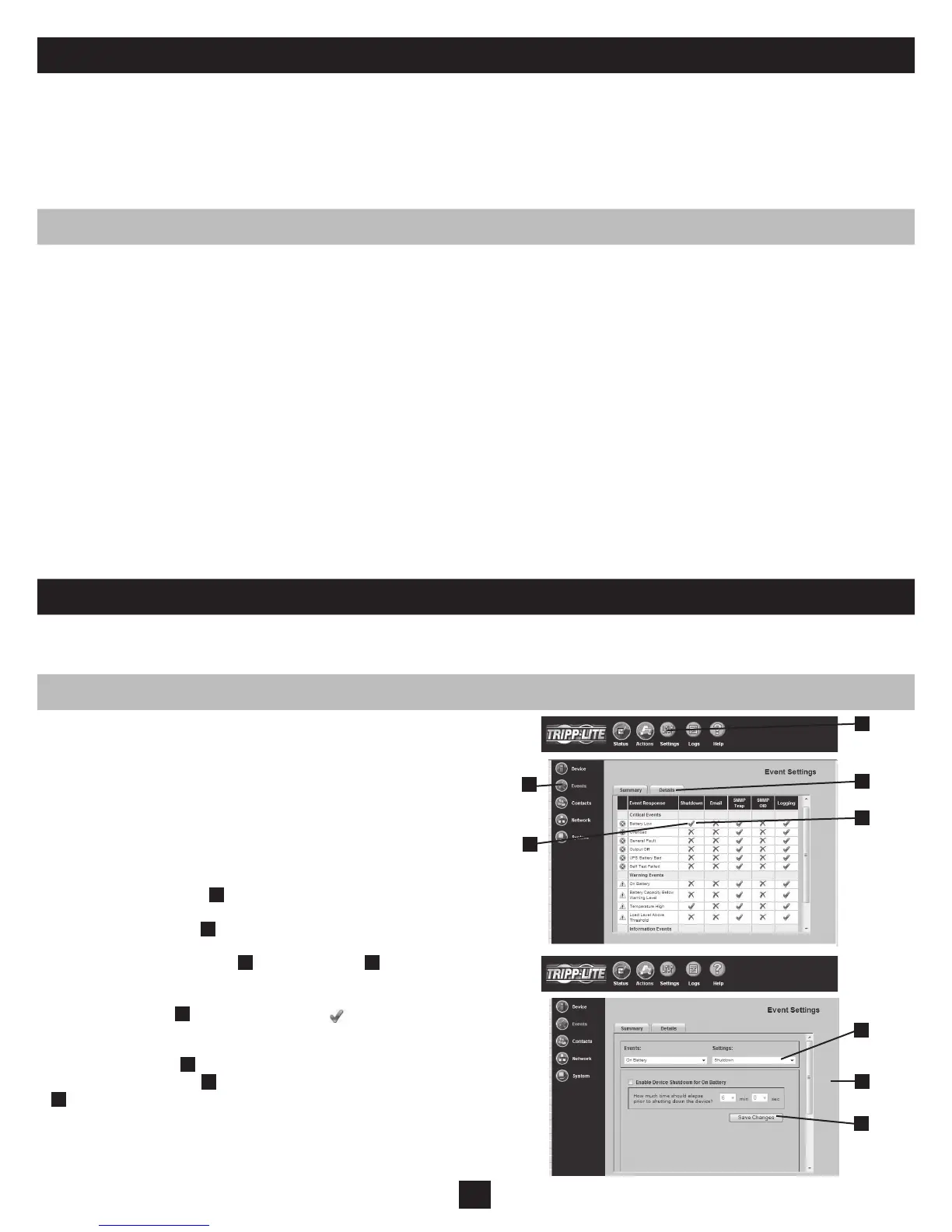
During a power failure, SNMPWEBCARD is pre-congured to shut
down the UPS system two minutes after receiving a low battery signal.
This allows the UPS system to provide the maximum available runtime
to connected equipment. If you want to change the default setting,
follow these instructions and refer to Figure 2-1:
Use a Web browser to open the PowerAlert console window for 1.
your SNMPWEBCARD (see 3.1 Opening the Web Console for
instructions).
Click the “Settings” button2.
A
at the top of the window.
Click the “Events” button3.
B
at the left side of the window.
4. Conrm that the “Battery Low”
C
in the “Shutdown”
D
column is
checked.
5. Click the Details Tab
E
or double-click on the icon to access
settings.
6. From the Details page
F
, choose your preferred settings from the
Settings drop down menu
G
and click the “Save Changes” button
H
.
Figure 2-1: UPS System Shutdown Settings
Tripp Lite UPS system or PDU with compatible accessory slot•
Ethernet network that supports the TCP/IP protocol•
One of the following options for remote monitoring and control: •
PowerAlert Network Management System•
SNMP-based Network Management Station (such as HP•
®
OpenView
®
)
Web browser that supports frames, forms and Java™ (such as Microsoft•
®
Internet Explorer
®
7.0 or later)
Standard telnet program •
For “Terminal Mode” conguration only: •
Terminal emulation software program (such as HyperTerminal) •
Computer with available DB9 serial port•
Warning: Use of this equipment in life support applications where failure of this equipment can reasonably be expected to cause the failure of the life support equipment or to signicantly affect its safety or effectiveness
is not recommended. Do not use this equipment in the presence of a ammable anesthetic mixture with air, oxygen or nitrous oxide.



 To Next Page