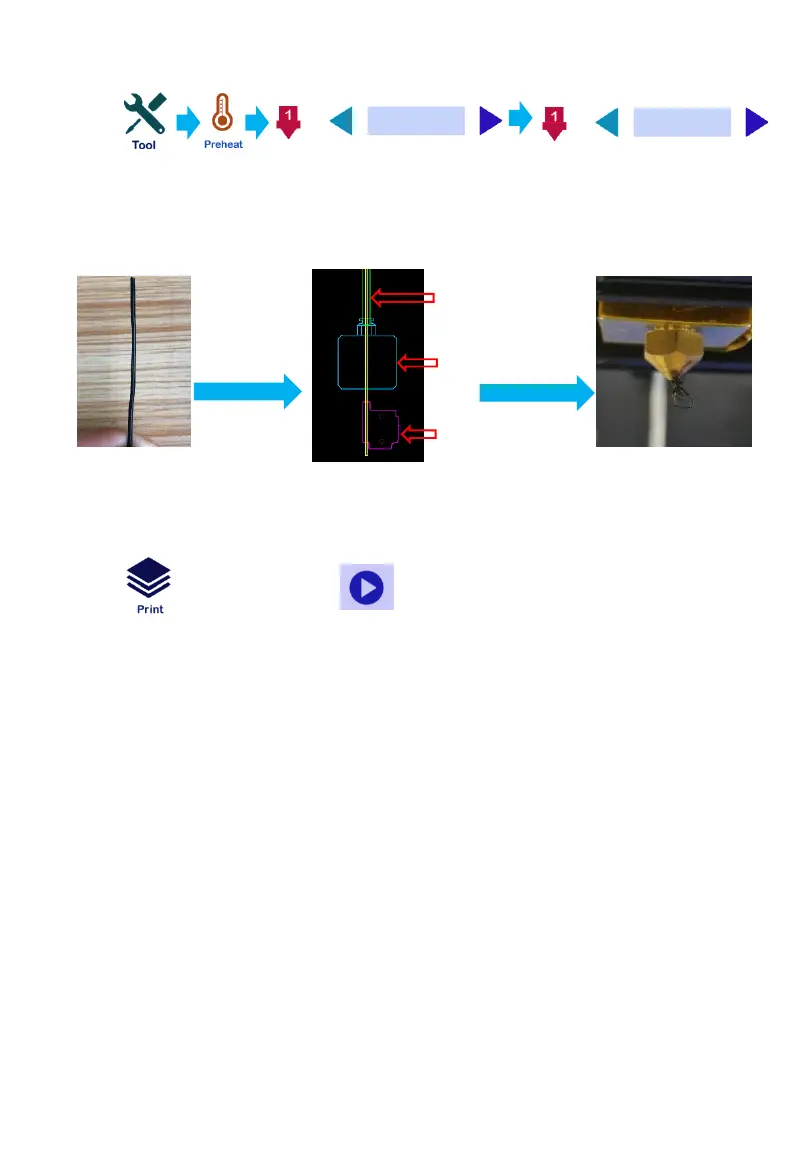
Load and unload filaments:
After waiting for temperature up to 180 ℃, filament go through from
the filament detection, extruder and feed pipe to the nozzle until the
filaments are squeezed , as the following picture shows :
Straighten
Filament
Print test:
Click →“TEST FILE”→ ,Start printing
11
Filament run
out detection
Extrusion
Feed pipe
Click
23/0
23/199
1. When you print the first layer , the filament is not stick into the
hotbed , it is because the nozzle position is high . Reversing the
hand screw nut in counterclockwise direction or set the lower
position of the fist layer when slicing.
2. If the nozzle has a small mount of filament flowing , it is
because the position of nozzle is low . Reversing the hand screw
nut in clockwise direction or set the higher position of the first
layer when slicing. ( The opposite way of the first suitation )


 To Next Page