4-1
CHAPTER 4
Data Handling
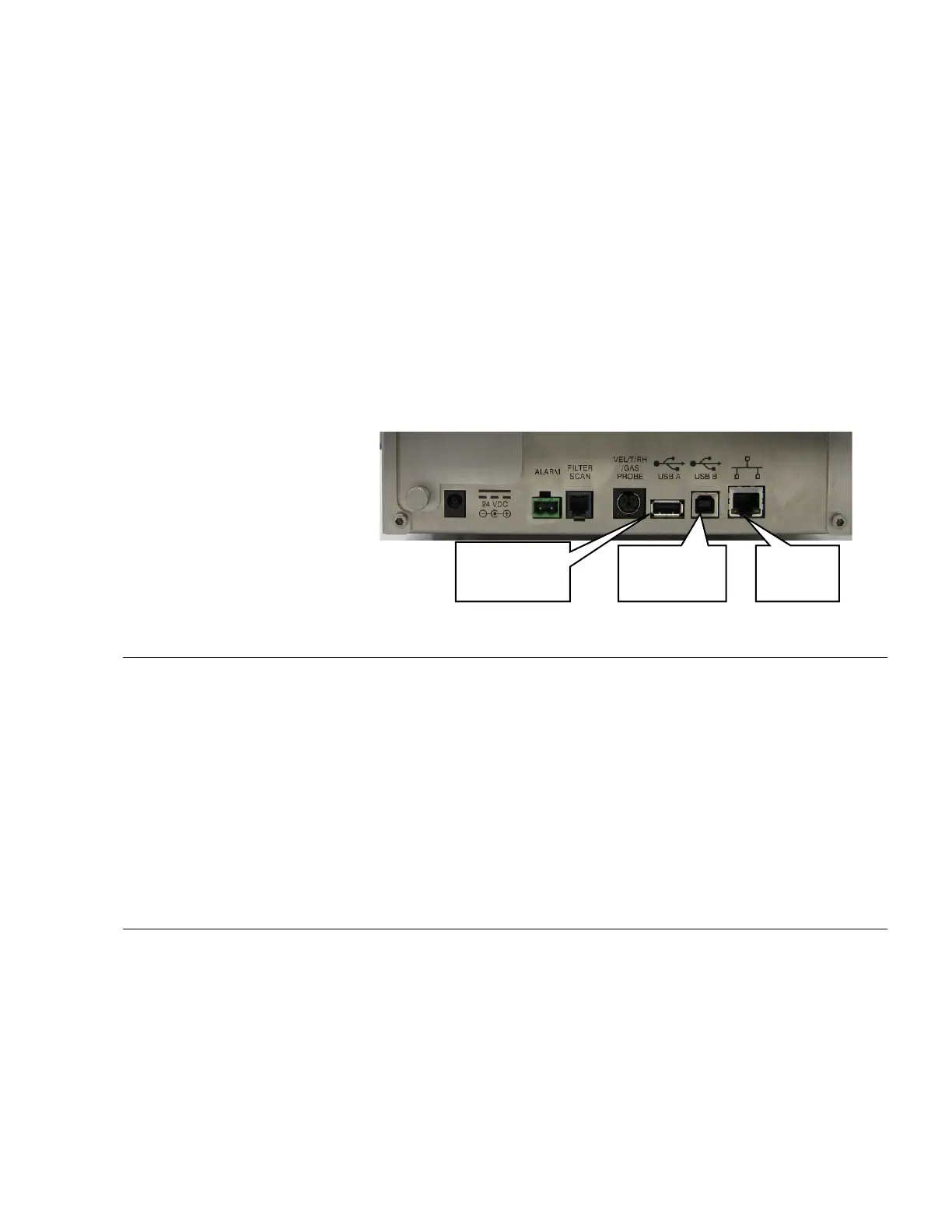
There are three basic ways to get data from the AEROTRAK™
Portable Airborne Particle Counter:
1. Data download to a USB Flash Drive.
2. USB port connection to a computer using T
RAKPRO™ Lite.
3. Ethernet connection to a TSI FMS Server.
USB Data Download
The AEROTRAK™ Portable Airborne Particle Counter is equipped
with a USB A host drive that will allow for the downloading of
stored data to a USB flash drive (also commonly called a USB
thumb drive). To download data, attach a flash drive to the USB A
host port and follow the instructions in the operation section of
this manual. The data is downloaded in XML format that can be
opened in Microsoft Excel
®
version 2003 or greater. The data files
can also be opened in the latest versions of OpenOffice
TM
.
USB Computer Communication
The AEROTRAK™ Portable Airborne Particle Counter is equipped
with a USB compatible to USB B cable for connection to a
personal computer. The cable plugs into the right side of the
instrument. Data from the particle counter can be downloaded to
a PC, through T
RAKPRO™ Lite and recipes can be uploaded to the
particle counters using the T
RAKPRO™ Lite software.
Ethernet
Port
USB A
(Flash Drive)
USB B (to
computer)













 To Next Page