3-26 AEROTRAK™ Portable Airborne Particle Counter
Data Tab
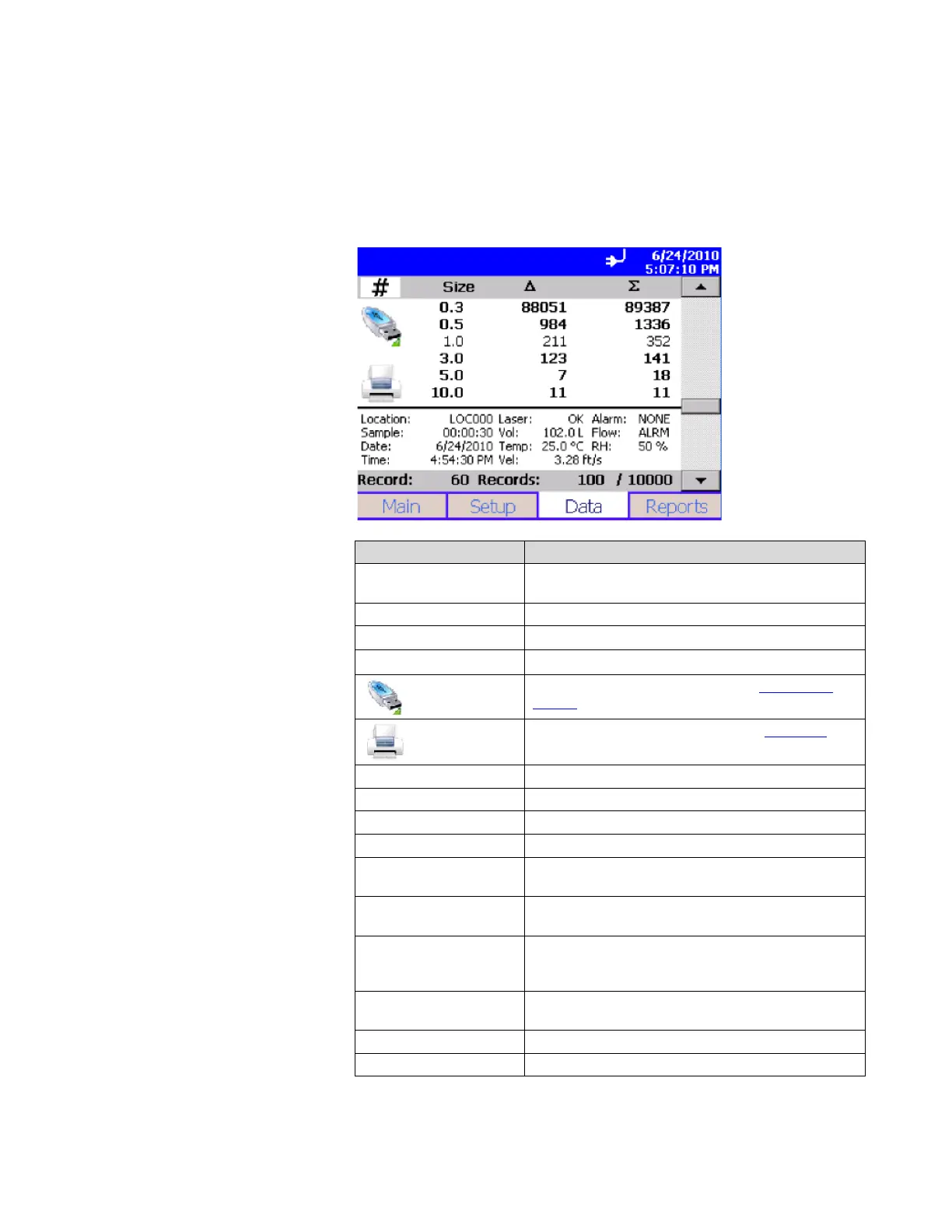
The Data tab lets you preview data that has been collected. Use
the scroll bar (slide) on the right to scroll though the records. The
record number is displayed at the bottom of the tab. As each
record displays, its data and relevant parameters are displayed.
Field Description
#, ft
3
, m
3
Button used to change between counts and
concentration displays.
Size Channel size.
∆
Differential concentration.
Σ
Cumulative concentration.
Export the data to a flash drive. See Export Data
Screen below.
Print data to the optional printer. See Print Data
below.
Location Location where the data was collected.
Sample Duration of the sampling period.
Date Date on which the data was collected.
Time Time at which data was collected.
Temperature
Temperature at the end of the time the data was
collected (if probe connected during sampling).
Humidity
Humidity level at the end of the time the data was
collected (if probe connected during sampling).
Flow
Status of the flow. Options are: OK or ALRM. OK
indicates the flow rate is good; ALRM indicates flow
rate is below the defined setting.
Alarm
Alarm threshold was triggered (YES) or not
(NONE).
Laser Status of the laser. Either: OK or SRVC.
Vol Volume of air that was sampled.













 To Next Page