3. Necessary basic knowledge
00 8811 17, 08/18 (Rev. 6.0) 15
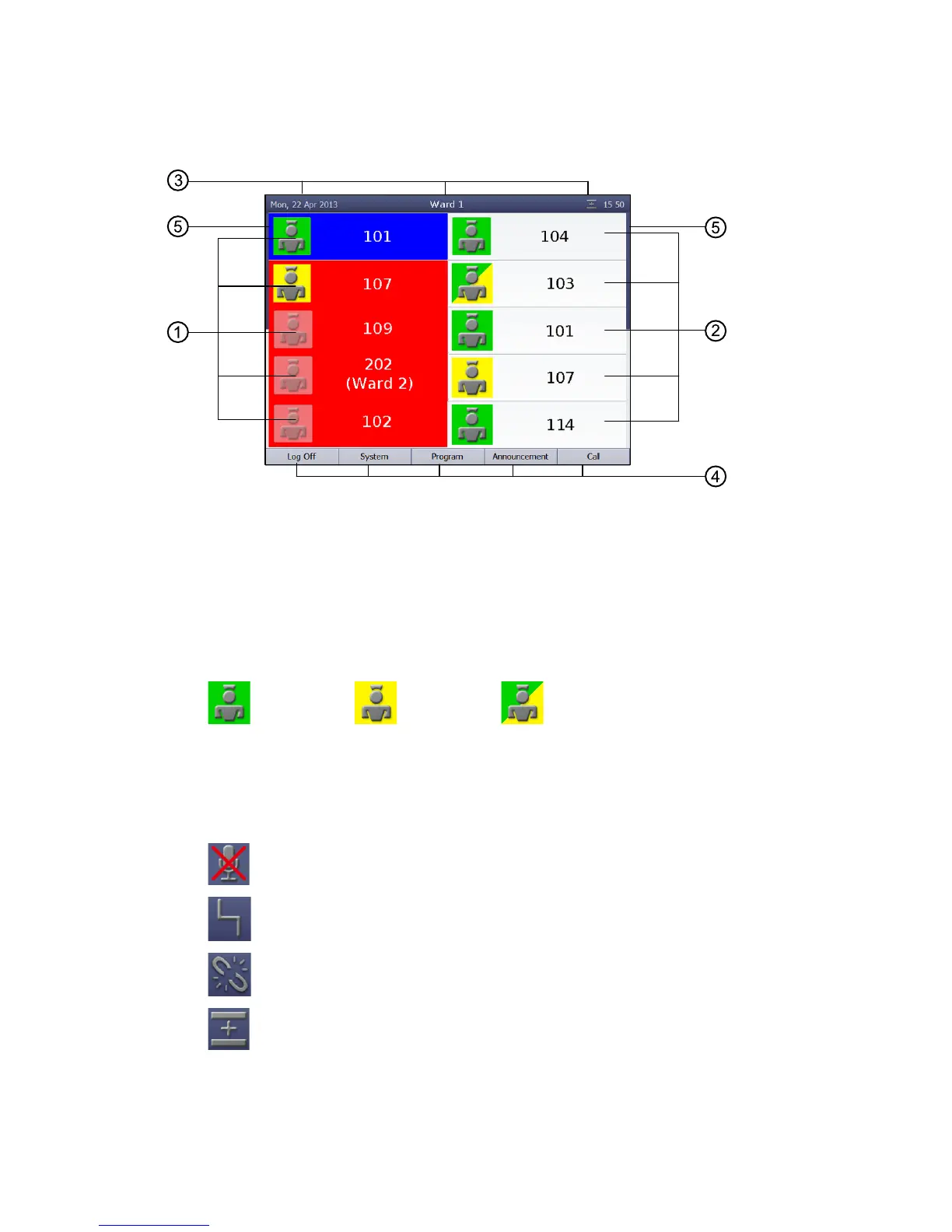
The main window
[1] Call list: Calls from connected rooms are shown. Fresh calls
are flashing. Calls can be selected with the select button next
to the item on the list.
[2] Staff list: The staff presence messages for the connected
rooms are listed in time order, oldest message from the top.
You can speak to the staff in the rooms via the select buttons
next to the item on the list.
Green: Yellow: Green/yellow:
Staff 1 Staff 2 Staff 1 and staff 2 in the same
room
[3] Title bar:
Date or menu level and time.
Privacy is switched on for calls from other consoles. See
page 58 onwards.
Fault in the nurse call system! See page 4 onwards.
No connection! ComStation
BUS-C
not ready or not com-
pletely ready to use! See page 5 onwards.
Ward coupling: This ward is coupled with other wards,
refer to page 47 onwards.



 To Next Page