92
POST DIVE FIRST 10 MINUTES ON SURFACE
When you ascend to 2 FT (0.6 M) for 1 second, the Surface Main screen will be dis-
played. If you descend during the first 10 minutes after surfacing (referred to as the
Transition Period), time underwater will be considered a continuation of that dive. The
time at the surface (if less than 10 minutes) will not be added as Dive Time.
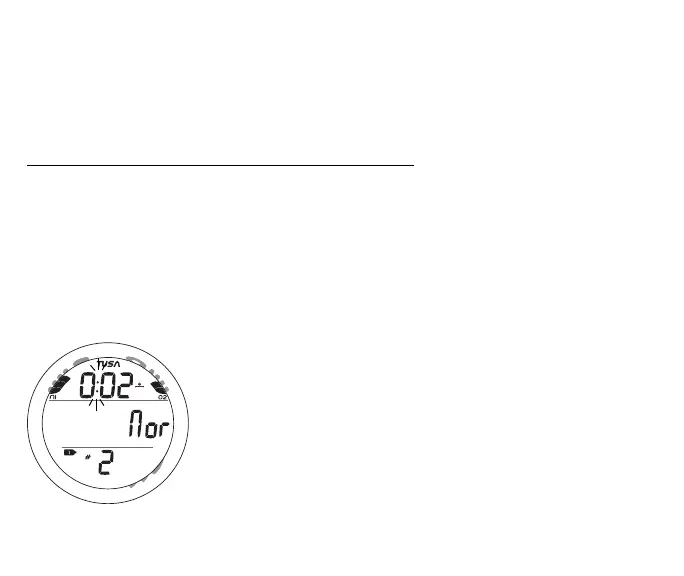
NORM Surface Main information includes (Fig. 84) -
> NiBG, and O2BG (if Nitrox)
> Surface Interval Time (hr:min) with colon flashing during the first 10 minutes and
clock/wave icon
> Graphic Nor
> Tank 1 icon representing Gas 1, default on surface
> Number of that dive with # icon
> Battery icon if a Low Battery condition exists, flashing if Too Low
During the Transition Period, ALT displays and the Log and
History can be accessed. Other modes (e.g., Plan, Fly, Sat, Set)
are accessible after 10 minutes on the surface.
• Press and release the A button (< 2 sec) to access the Log
Preview screen for that dive.
• Depress the A button for 2 seconds to access SURF ALT.
• Press and release the M button (< 2 sec) to access the Watch
Default Time screen.
• Press the L button to activate the Backlight.
Fig. 84 - NORM SURF MAIN
(< 10 min after surfacing)
M
S
A
L



 To Next Page